


Setting up Photo Albums
Wix Photo Albums: Changing the Album URL
You can customize the URL of your published photo album for free. This creates a more professional and personalized look when sharing albums with your customers.
If you've connected a domain to your site, the customizable text is at the very beginning of the URL. If not, the text comes after the domain as follows:
Before the domain: https://album123.mystunningwebsite.com
After the domain: https://mystunningwebsite.wixsite.com/album123
New Photo Albums are now built on Wix Studio templates:
Old free album URLs have the following structure: https://mystunningwebsite.wixsite.com/album123
New free album URLs have the following structure: https://mystunningwebsite.studio.com/album123
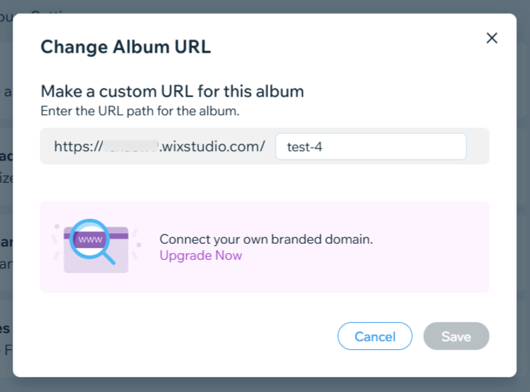
In this article learn more about:
Changing the URL of your photo album
Change the URL of your photo album by adjusting the customizable text at the beginning or end of the URL.
Go to Photo Albums in your site's dashboard.
Click Manage Album next to the relevant album.
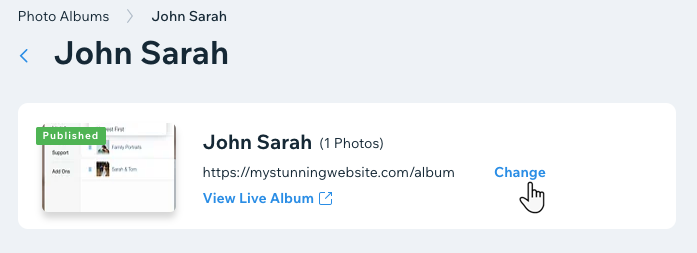
Click Change next to the album's URL.
Update the URL of the album.
Click Save.
Frequently Asked Questions (FAQs)
Click a question below to learn more about changing the URL of your photo album.
Are there any guidelines when it comes to changing my URL?
Yes. Please follow these guidelines when changing your URL:
Characters can only be ASCII letters, digits and hyphens.
Characters must be in US-ASCII. For example, characters such as ¥, ñ, etc., are invalid.
Hyphens cannot appear at the beginning or the end of the domain name.
Total length can be no more than 20 characters.
Characters can only be lowercase.
How long will it take for my newly connected domain to propagate?
It can take up to 48 hours for a newly connected domain to propagate. Learn more about domain propagation.
How long does it take an album subdomain to propagate?
After upgrading your site and connecting your domain, it takes up to 24 hours for the new album subdomain to propagate.
How long will it take for my newly connected domain to propagate if I connect a domain after publishing my album?
If you connect a domain after publishing your album, your custom URL is updated automatically once the domain propagates.
What happens if I have more than one domain connected to my site?
If you have more than one domain connected to your site, the new URL you create is automatically connected to your primary domain.
What troubleshooting steps can I take if my subdomain is not connected after 24 hours?
If, after 24 hours, the subdomain is not connected, please review the subdomain troubleshooter.
Can I connect a Photo Album subdomain to a domain that is connected to Wix via pointing?
Photo Album subdomains cannot be connected to a domain that is connected to Wix via pointing. Learn how to switch your domain connection method.
Why is there a difference in the URLs of new albums I'm creating vs old ones?
Any new Photo Albums that you create are built on Wix Studio templates, and therefore the free album URL's have changed, to include Wix Studio structure.
Old free album URL's look like this: https://mystunningwebsite.wixsite.com/thailand, whereas new free albums URL's look like this: https://mystunningwebsite.studio.com/thailand.