


Wix Forms FAQ
Wix Forms: An Overview
With Wix Forms, create fully customizable forms and collect all the info you need to run and grow your business. Add forms directly to your site for lead capturing, subscriber sign ups and more. Once you've created your forms, track all the submissions right from your dashboard.

The newest version of Wix Forms offers a more robust solution for creating and managing forms. This article will help you understand the differences between old and new Wix Forms.
Explore the types of forms to create
Choose from premade forms, or start from scratch to create your own custom form.
Our premade forms come in different templates such as contact forms, registration forms, job applications, price quotes, and more. Drag and drop the form directly onto your site, then customize it to match your site's design theme.
Get started by adding a form to your site.

Using old Wix Forms?
You can also create a standalone form that isn't related to your site and can be shared with anyone using its URL.
Tailor the form to your exact needs
There are many different types of form fields to choose from when building a form. Depending on the form you're creating, add contact fields, a signature field, multiple choice options, and more.
Templates come with pre-selected fields that you can modify, but you can also choose to build a form from scratch. Whether it's a template or a blank form, customize the settings, design and layout to your needs.
You can also add conditional rules to improve the way you collect information based on your visitor responses. If your form is too long, turn it into a multi-step form to make it more manageable for visitors to fill out.

View all submissions in one place
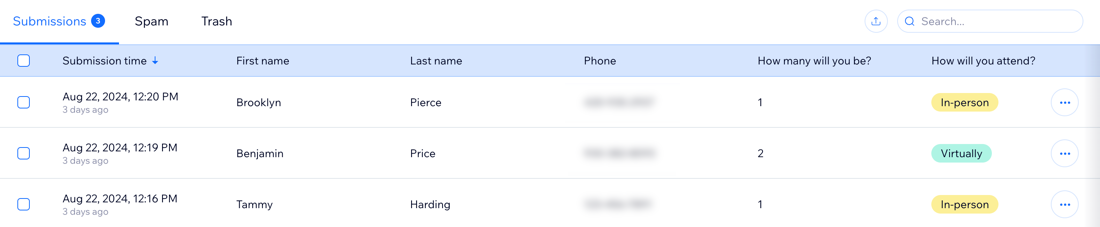
Once you've published a form on your site, all the form submission data appears in your Forms & Submissions dashboard. Sort and filter the submissions for each form separately. You can also export form data from a submission table.
Stay updated on submissions while you're on the go
Whenever someone submits a form, you automatically get a notification to your account email and the Wix app. You can set up and manage additional notifications with Wix Automations, like having notifications sent to your Wix Inbox too.
If you have a site team working with you, choose who gets notified and how they'll receive notifications. Add site collaborator emails or external emails to the list of email addresses who get notified about new form submissions.