top of page

Wix Forms FAQ

Wix Forms: Adding a Subscriber Opt-In Checkbox to a Site Form

Add a subscriber opt-in checkbox to any of your Wix forms to turn your visitors into subscribers with one click. When visitors select the subscriber opt-in checkbox, they are giving you permission to send them marketing materials and emails.
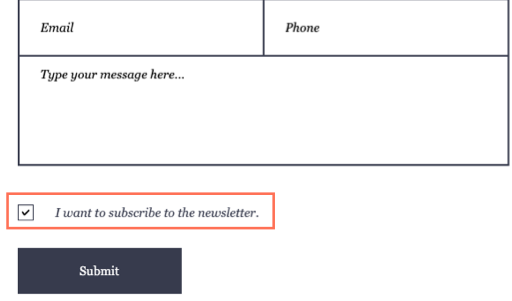
An example of a subscriber opt-in checkbox on a form in a live Wix site

Tip:

If you are using old Wix Forms, you also have the option to add and set up a Get Subscribers form.

To add a subscriber opt-in checkbox to your form:

New Forms

Old Forms

  1. Go to your editor and click the relevant form.

  2. Click Edit Form.

  3. Click Subscribe.

  4. Click the new field in your form.

  5. Click Settings and customize it using the available options:Checkbox message: Update the text next to the checkbox. It should tell visitors what happens if they select the checkbox e.g. 'I want to subscribe to your newsletter,' or 'Make me a subscriber!'
    Checked by default: Enable the toggle so that the checkbox displays as automatically checked. Visitors must deselect it if they don't want to subscribe.
    Required: Enable the toggle so that visitors must fill out this field before submitting the form.
    Enable Double opt-in: Visitors must verify their email address before they can subscribe to your mailing list.
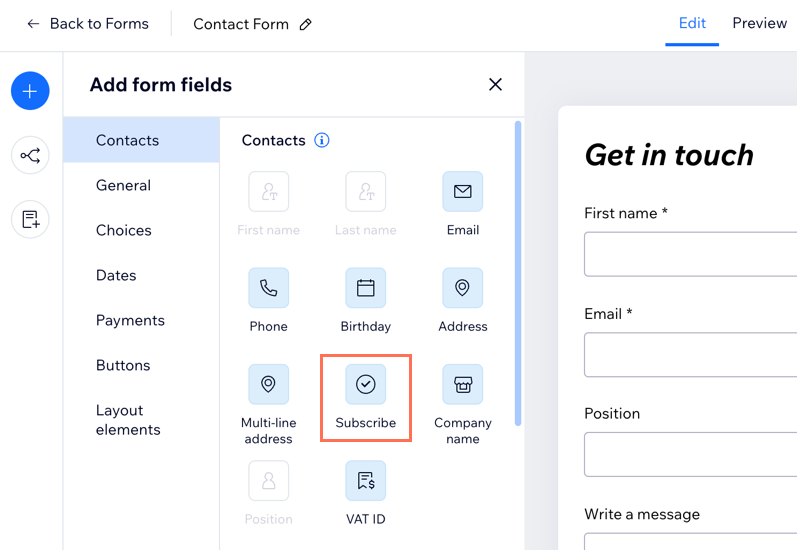
Adding a subscribe checkbox to a form in the new Form Builder.

What's next?

  • Once visitors select the checkbox, they are added as 'subscribers' in your contact list.

  • Enable double opt-in to have subscribers verify their email before they can be added to subscribers. Double opt-in ensures your emails are reaching the right audience.

Need A Professional Website?
Contact Us 
Today!

Wix Chat: Automatically Sending Chat Messages or Responding to Chat Messages

Wix Chat: About Notifications

Wix Chat: Deleting Wix Chat

Wix Chat: Adding the WhatsApp Channel to Your Chatbox

Wix Chat: Viewing and Chatting with Live Site Visitors

Wix Chat: Customizing the Chat Icon on Your Mobile Site

Wix Chat: Translating Wix Chat

Wix Chat: Allowing Members to Chat with Each Other Using Members Chat

Wix Chat: Customizing Your Chat Settings

Wix Chat: Designing Your Chatbox

Wix Chat: Adding Wix Chat to Your Site

Wix Chat: An Overview

Your AI Site-Chat Conversations Quota

Designing and Customizing Wix AI Site-Chat

Training Your AI Site-Chat

Testing Your Wix AI Site-Chat

Adding and Setting Up Wix AI Site-Chat

About Wix AI Site-Chat

Wix Inbox: Sending a Broadcast Message to Your Contacts in the Wix App

Wix Inbox: Working with Site Collaborators

Wix Inbox: Connecting WhatsApp Business to Inbox

Wix Inbox: Connecting Your Facebook Page

Wix Inbox: Connecting Instagram to Inbox

Wix Inbox: About Wix Inbox Channels

Wix Inbox: Connecting Your Gmail Account

Wix Inbox: Managing Your Notification Settings

Wix Inbox: Managing Your Inbox

Wix Inbox: Setting Up Your Inbox Profile and Outgoing Emails

Wix Inbox: Sending Messages and Attaching Items

Wix Inbox: An Overview

wix experts
Graphic2Traffic web design
©
bottom of page