


Selling and promoting your music
Wix Music: Allowing Fans to Download Your Music
Control the download options for your music from the Music Library in your dashboard. You can let your visitors download an entire album, a single, or a specific track from an album, single or playlist. You can also set a price or make your music available for free.
Additionally, you can choose to only allow downloads for visitors who enter their email address. The download link in the email is active for three days only. This is for your protection to prevent pirating.
In this article learn more about:
Allowing your fans to download your music
Customize the download options on your site for your fans. Decide whether you want to offer your music for free, a fixed price or let fans choose the price.
Note:
Currently, it is not possible to allow fans to download an entire playlist.
To set your download options:
Go to My Music in your site's dashboard.
Click the relevant album / single.
Click Edit in the Info section.
Note: For a track within an album, hover over the track and click the Edit Track Info icon.
icon.
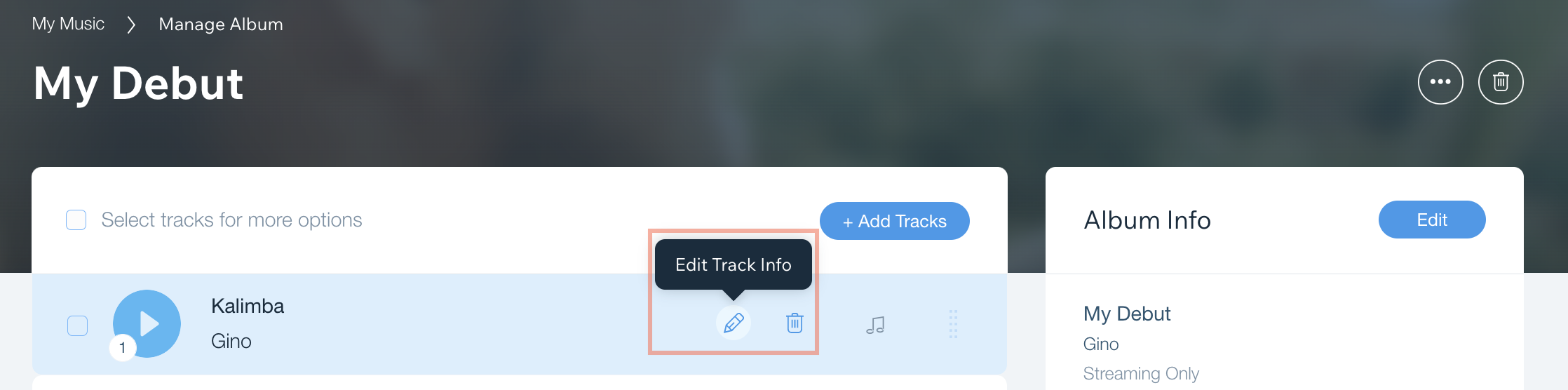
Scroll down to Sale and Download Options on Your Site.
Click the Download Options drop-down and select an option:Sell for a fixed price: Set a price for your album in your desired currency.
Free download: Visitors can download your album for free.
No downloads: Your album cannot be downloaded.
Let fans name their price: Your fans can choose how much they want to pay for your album. You can set a minimum album price under Album Price.
Require email for download: Your fans need to subscribe to your mailing list to download your album.
FAQs
We are here to help with all your questions. Click a question below to learn more.
Can I view analytics related to my music?
Yes. You can track all your analytics related to Wix Music (including download statistics) using Wix Analytics Reports.
How long can music be downloaded for after it is purchased?
After purchase, your customers can download the music they purchased an unlimited amount of times, for up to 72 hours. If the music is not downloaded within this time period, you cannot resend the link.
In what formats can my fans download my music?
Once your files have been converted, your fans can download your music in FLAC or MP3 files. FLAC is only offered if a FLAC, MP4A, or WAV version was uploaded.
Learn more about supported files for Wix Music.
How can I accept payments for my music?
Learn how to set up payments for your music, commission-free with Wix.