top of page

Wix Contacts FAQ

Wix Contacts: Importing Contacts from a Gmail Account

Create an instant mailing list by importing your Gmail account contacts. You can choose whether to import all your Gmail contacts or selected contacts. You can have up to 200,000 contacts per site.

Note:

In order to be imported, each contact must include at least one of the following fields:

  • Phone

  • Email

  • Address

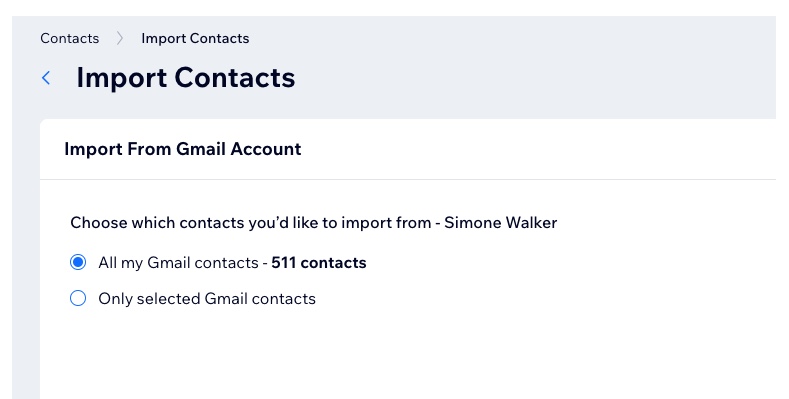
A screenshot of importing Gmail contacts

To import contacts from a Gmail account:

  1. Go to Contacts in your site's dashboard.

  2. Select Import contacts from the Import/Export drop-down at the top.

  3. Click Connect under Gmail account.

  4. Sign in to your Gmail account and click Continue.

  5. Select the checkbox to give Wix access to see and download your contacts. Then click Continue.

  6. Choose which contacts to import:All my Gmail contacts: All contacts are automatically imported.
    Only selected Gmail contacts: Use the drop-down to select the group of contacts (i.e. Gmail label) to import.
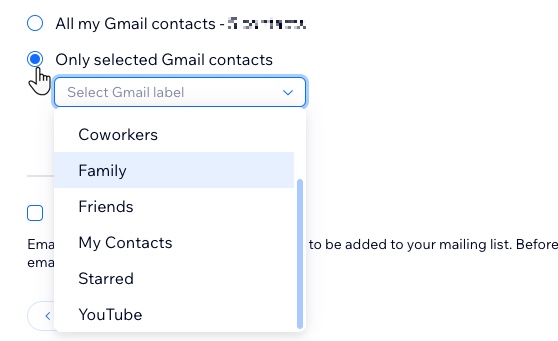
A screenshot of the selected gmail contacts dropdown

  1. (Optional) Select the Mark as email Subscribers checkbox.
    Note: If selected, all contacts uploaded in this batch will be marked as subscribers (people who have agreed to be added to your mailing list).

  2. Click Next.

  3. (Optional) Add a label by selecting an existing label or start typing to create a new label. Labeling helps keep your contact list organized.

  4. Click Import.

  5. Click Done.

Need A Professional Website?
Contact Us 
Today!

Wix Forms: Troubleshooting

Wix Forms: Removing a Form from Your Site

Wix Forms: Saving Your Form Data to Your Contacts

Wix Forms: Creating Automated Email Responses for Form Submissions

Wix Forms: Choosing Who Gets Notified About Form Submissions

Wix Forms: Viewing and Managing a Submissions Table

Wix Forms: Customizing the Success Message and Thank You Page of Site Forms

Wix Forms: Designing Your Site Forms

Wix Forms: Adding a Signature Field

Wix Forms: Protecting Your Site Forms from Spam

Wix Forms: Adding a Subscriber Opt-In Checkbox to a Site Form

Wix Forms: Adding a File Upload Field

Wix Forms: Managing Your Form Fields

Wix Forms: Managing Your Standalone Form Fields

Wix Forms: Translating Your Forms with Wix Multilingual

Wix Forms: Adding and Setting Up a Standalone Form

Wix Forms: Adding and Setting Up a Form on Your Site

Wix Forms: An Overview

Wix Functions: Creating a Custom Loyalty Program Reward

Wix Functions: Adding Custom Validations to Your Forms

Wix Functions: Adding Additional Fees at Checkout

Wix Functions: Creating a Function

Wix Automations: Understanding Conditions Operators

Wix Automations: Using the Run Velo Code Action

Wix Automations: Troubleshooting Wix Automations

Wix Automations: Creating a Multi-Action Automation

Wix Automations: Sending Data via Webhook

Using Zapier to Automate Connections with Third-Party Apps

Wix Automations: Sending Data to Google Sheets

Wix Automations: Managing Your Automations

wix experts
Graphic2Traffic web design
©
bottom of page