


Managing your calendar & bookings
Wix Bookings: Syncing Your Microsoft Calendar
Keep track of your schedule, avoid double bookings and arrange for cover when needed by syncing Wix Bookings with your Microsoft calendar (Outlook or Office365). You can also view your personal and business appointments in one place.
Note:
Currently, you cannot sync your Microsoft Exchange calendar with Wix Bookings.
In this article, learn more about:
Syncing Wix Bookings with your Microsoft calendar
You can sync your Outlook or Office365 calendar with Wix Bookings to make it easier to balance your personal and business appointments. After syncing, your personal appointments from your Microsoft calendar block off time in your Bookings calendar.
Before you begin:
Make sure to upgrade your site to sync your personal calendar with Wix Bookings.
To sync your Microsoft calendar with Wix Bookings:
Go to Booking Calendar in your site's dashboard.
Click the Manage Calendar drop-down in the top right.
Click Sync Personal Calendar.
Select the relevant account you want to sync.
Click Sync next to Outlook or Office365.
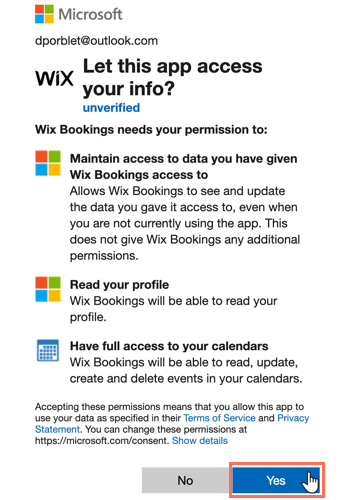
Login with your Microsoft account details
Click Yes to grant Wix access to your personal calendar.
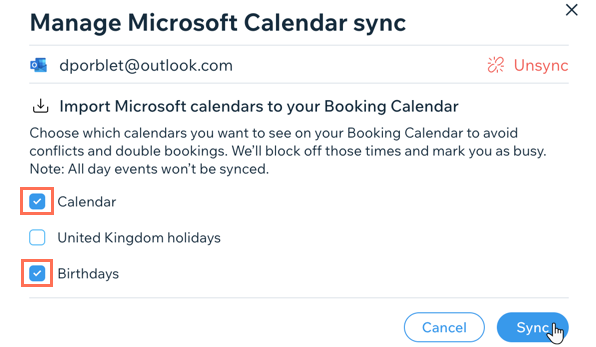
Enable the Import Microsoft Calendar events toggle.
Select the checkboxes next to each Microsoft calendar your want to import to your Booking Calendar.
(Optional) Enable the Export Booking Calendar events toggle to display your bookings sessions on your microsoft Calendar.
Click Sync.
Events from your Microsoft calendar are now visible on your Wix Bookings calendar. Your Wix Bookings sessions also appear in your Microsoft calendar if you enable Booking calendar events exports.
FAQs
How do my staff sync Wix Bookings with their Microsoft calendars?
You can invite staff to sync their personal calendars and share the steps above with them once they accept your invite.
I received an error message saying "sync failed" what should I do?
It can take several minutes to sync your Microsoft calendar. It is important to not navigate away or refresh the page while the sync is taking place. When the sync completes, choose which calendars you want to sync. If the sync fails, you can try again.
I deleted my Microsoft account. How do I connect a different personal calendar with Wix Bookings?
If you delete your Microsoft account, you must also disconnect it from the Wix Booking Calendar before syncing another calendar. At present, it is not possible to sync multiple personal calendars with Wix Bookings. If you would like to see this feature in future, you can vote for it here.
How do I make Booking calendar events appear in my Microsoft calendar?
Enable the Export Booking Calendar events toggle to display your bookings sessions on your Microsoft calendar.
Go to Booking Calendar in your site's dashboard.
Click Manage Calendar.
Click Sync Personal Calendar.
Click Manage next to Outlook or Office 365.
Enable the Export Booking Calendar events toggle.
Click Sync.

Troubleshooting issues with Microsoft calendar syncing
Try the steps below if you are unable to successfully sync your Microsoft calendar or if you notice that some events do not appear in your Booking Calendar.
Step 1 | Confirm the Microsoft account
Check the email address of the synced Microsoft account by hovering over the "info" icon under the relevant staff member's profile in the Staff tab in the dashboard.

Step 2 | Check that the selected calendars are correct
Go to Booking Calendar in your site's dashboard.
Click Manage Calendar at the top.
Click Sync personal calendar.
Click Manage.
Check that the correct calendars you want to sync are selected.

Step 3 | Check any third party apps you use
Only events originally created in Microsoft will show in the Wix Booking Calendar. If you're using a third party app, such as Square Calendar or Calendly, you need to re-add these events manually in Wix Bookings.
Step 4 | Make sure the event isn't an all-day event
If your event is listed in Microsoft as an All-Day event, it won't be synced to Wix.
Step 5 | Make sure to enable the Export Booking calendar events toggle
If your Wix bookings aren't showing in your Microsoft calendar, make sure that the toggle on Export Booking Calendar Events is on.
