top of page

Managing your calendar & bookings

Wix Bookings: Marking Attendance for Classes

As clients show up for your classes, you can mark their attendance from the Participants list. If you mark attendance regularly, you can later check your attendance statistics and other analytics in the Reports tab.
Note:

We are in the process of releasing a new version of the Booking Calendar. You may see a slightly different version in your calendar.

To mark attendance:

  1. Go to Booking Calendar in your site's dashboard.

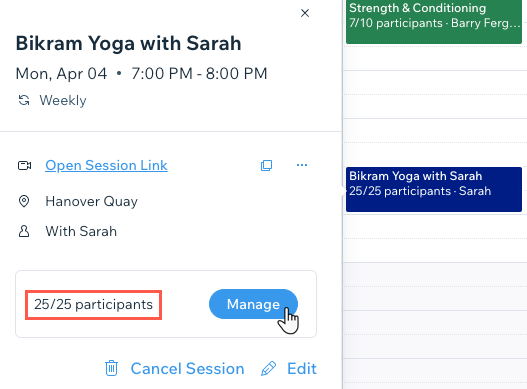
  2. Click the relevant class in your calendar.

  3. Click Manage next to participants.

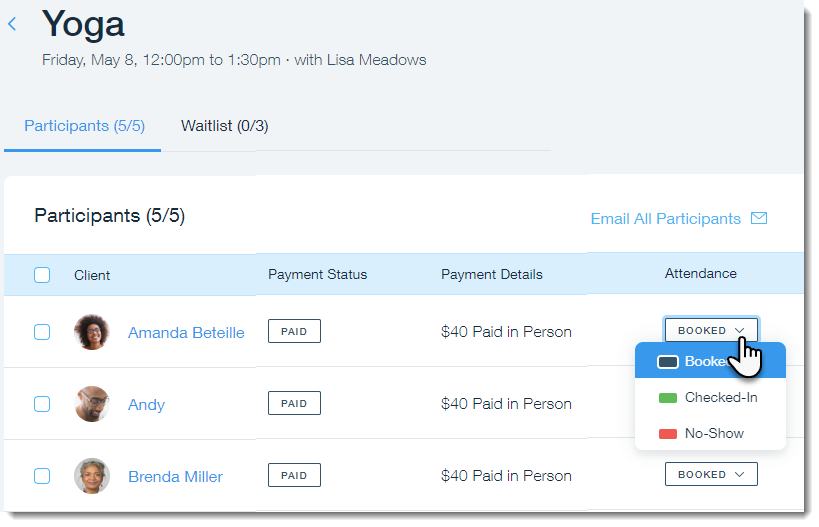
  1. Click the Attendance drop-down next to the relevant client and choose an option:Booked: Your client booked the class and hasn't yet arrived.
    Checked-In: Your client arrived to the class.
    No-Show: Your client booked the class but never arrived.

Tip:

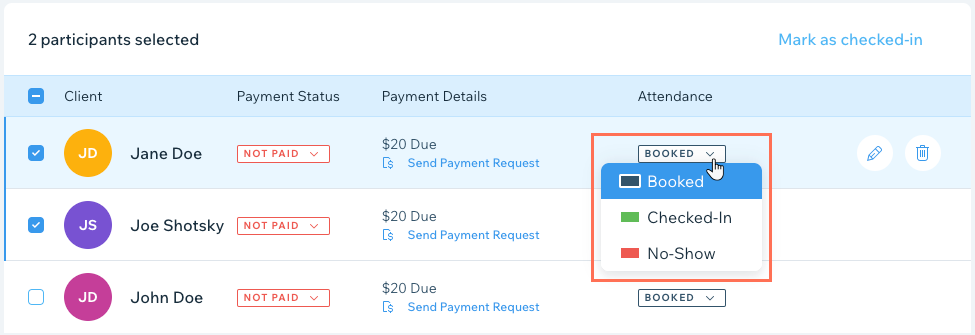
You can mark the attendance of multiple clients by selecting the checkbox next to each one.
What's next?

Need A Professional Website?
Contact Us 
Today!

Wix Forms: Troubleshooting

Wix Forms: Removing a Form from Your Site

Wix Forms: Saving Your Form Data to Your Contacts

Wix Forms: Creating Automated Email Responses for Form Submissions

Wix Forms: Choosing Who Gets Notified About Form Submissions

Wix Forms: Viewing and Managing a Submissions Table

Wix Forms: Customizing the Success Message and Thank You Page of Site Forms

Wix Forms: Designing Your Site Forms

Wix Forms: Adding a Signature Field

Wix Forms: Protecting Your Site Forms from Spam

Wix Forms: Adding a Subscriber Opt-In Checkbox to a Site Form

Wix Forms: Adding a File Upload Field

Wix Forms: Managing Your Form Fields

Wix Forms: Managing Your Standalone Form Fields

Wix Forms: Translating Your Forms with Wix Multilingual

Wix Forms: Adding and Setting Up a Standalone Form

Wix Forms: Adding and Setting Up a Form on Your Site

Wix Forms: An Overview

Wix Functions: Creating a Custom Loyalty Program Reward

Wix Functions: Adding Custom Validations to Your Forms

Wix Functions: Adding Additional Fees at Checkout

Wix Functions: Creating a Function

Wix Automations: Understanding Conditions Operators

Wix Automations: Using the Run Velo Code Action

Wix Automations: Troubleshooting Wix Automations

Wix Automations: Creating a Multi-Action Automation

Wix Automations: Sending Data via Webhook

Using Zapier to Automate Connections with Third-Party Apps

Wix Automations: Sending Data to Google Sheets

Wix Automations: Managing Your Automations

wix experts
Graphic2Traffic web design
©
bottom of page