


Previous Automation Builder
Wix Automations: An Overview
The links in this article discuss the previous version of the automation builder. If you are having a different experience, learn more about our new automation builder.
Wix Automations is a powerful tool that streamlines your work processes and saves time on manual tasks, with just a few clicks. You can send automated emails to your visitors, remind them about their invoices, create tasks for your team, and much more. Automations work across a range of apps and offer tailored options based on how each app works.

Ready to get started?
Learn how to create a new automation.
Watch your automations list grow as your site grows
All businesses are different and benefit from different automations. As you build your site, Wix will install automations specific to the apps you're using. For example, if you add a Wix Blog to your site, you'll automatically notify members of new posts and notify followers of new comments. You can deactivate these "Installed for you" automations at any time.
Learn more about "Installed for you" automations.

Benefit from the automations we recommend for your business
In addition to your "Installed for you" automations, you'll see Wix's suggested automations on your Automations page. These are specific to your business type and the apps you've added to your site. They are listed by business benefit to help you choose: "Sell more online", "Engage with clients", and more. Take our recommendations or create your own automations from scratch.

View and manage your automations from one place
No matter which apps your automations are connected to, you'll be able to view all automations on your Automations page. Here, you can see automation summaries and key information, such as total trigger count and most recent trigger date. You'll also be able to make edits, instantly activate or deactivate, and filter your automation list.
Learn more about managing your automations.

Reach out with automated emails and track their success
Automating the process of sending an email is one of the most popular automations. Automatically send emails to acknowledge form submissions, remind customers about abandoned carts, and more.
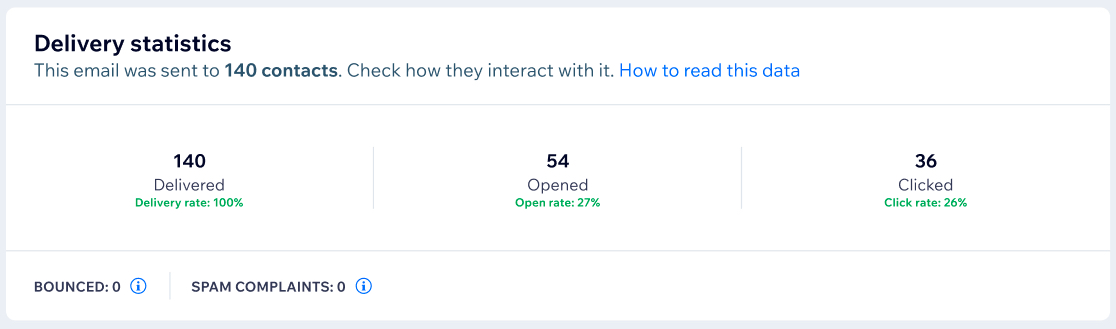
All email automations include email statistics. These provide valuable information around email success rate and how recipients have interacted. View details such as total emails delivered and opened, which links were clicked, and how many recipients visited your site.
Learn more about checking your automation statistics.
FAQs
Here are some common questions about automations:
How do I understand which automations are available to me?
The automations you'll be able to create will depend on the apps (e.g. Wix Blog, Wix Restaurants) you have added to your site.
Automation trigger options are specific to the app you've selected, and automation action options are specific to the trigger you've selected. Select an app to view your trigger options, then select your trigger to view your action options.
Popular automations include:
Sending a "thank you", "welcome" or "next steps" email when a visitor submits a form. Learn more about sending automated emails to contacts after form submissions
Sending a discount coupon or reminder email when a customer has abandoned their shopping cart. Learn more about automatically sending discount coupons
Sending an email when an invoice is overdue. Learn more about Wix Invoices automations
Awarding loyalty points when a restaurant order is received. Learn more about Wix Restaurants automations
Sending a chat message when a form is submitted, or automatically replying to incoming chat messages. Learn more about Wix Chat automations
How many automations can I set up?
You can create as many automations as you need.
Can I connect my automations to apps that I use outside of my Wix site?
Yes, you can use Zapier to connect your Wix automations to external apps such as Slack, Trello and Google Docs.