top of page

Third Party Payment Providers

Using a Different Account with the Same Payment Provider

If you have more than one account with a third-party payment provider, you can switch to your preferred account to accept payments on your Wix site.

If you're not sure which provider account you currently have connected to your Wix site, you can check which provider you have connected and view your current credentials before you switch.

In this article, learn how to:

Viewing your provider credentials

  1. Go to Accept Payments on your site's dashboard.

  2. Click Manage next to the payment provider / method you want to check.

  3. View your current provider credentials in the Account information section.
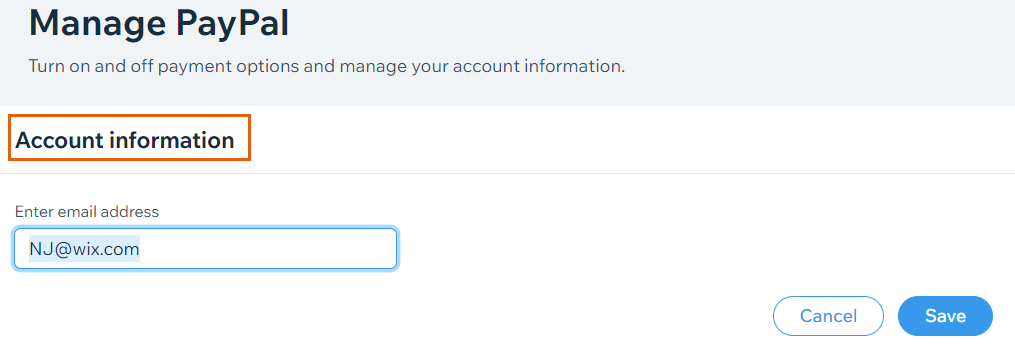
A screenshot showing where you can view your provider credentials.

Switching to a different account

  1. Go to Accept Payments on your site's dashboard.

  2. Click Manage next to the payment provider / method you want to change.

Manage PayPal button,

  1. Follow the relevant steps depending on your provider:
    PayPal:Enter the email address of your desired account in the Account information section.
    Click Save.

    Stripe:Click Change account.
    Enter your Stripe credentials and click Continue.

    Other payment providers:Enter the credentials of your desired account in the Account information section.
    Click Save.

FAQs

Click a question below to learn more about accepting payments.

How do I check which payment provider account I have connected to my site?

To check which payment provider you have connected and to view your account credentials, follow the steps to view your credentials.

I'm using Wix Hotels. How do I set up my payments?

Payments for Wix Hotels is managed through the Hotels tab. Learn how to set up payments for Wix Hotels.

Need A Professional Website?
Contact Us 
Today!

Embedding a Yandex Map on Your Wix Site

Apps Made by Wix: Adding and Setting Up the Wix Weather App

Adding and Setting Up the Wix Hit Counter App

Embedding a VKontakte Community Widget on Your Site

Embedding Your Tumblr Blog and Posts

Wix Comments: An Overview

Adding Pinterest Content to Your Site

Wix Apps: Adding and Setting Up the PDF Viewer App

Adding and Setting Up the Open for Business App

Embedding an Odnoklassniki (OK) Like Button on Your Site

Adding and Setting Up the Site Badges App

Gift Card Payment Confirmation

Adding and Setting Up the Get Funding App

Adding and Setting Up the Get Files to Dropbox App

Apps Made by Wix: Adding and Setting Up the Dropbox Folder App

Adding and Setting Up the Countdown Clock App

Adding and Setting Up Wix Site Search

Understanding & Customizing Your Search Results Page

Customizing Your Site Search Bar

About Wix Site Search

Displaying a Different Variant (e.g. Color) of an Item in the Amazon App

Retrieving Your Amazon Credentials

Adding and Setting Up the Amazon App

Setting Permissions for Google Drive Files and Folders

Adding and Setting Up the Google Drive App

Displaying Events Using Your Site Colors or Google Colors in the Google Event Calendar App

Displaying Private Events in Your Google Event Calendar App

Managing Your Google Event Calendar App

Adding and Setting Up Google Event Calendar

Wix FAQ App: Using the Wix App to Display FAQs in Your Preferred Member Apps

wix experts
Graphic2Traffic web design
©
bottom of page