top of page

Additional Wix Apps

Embedding a VKontakte Community Widget on Your Site

Add a VKontakte community widget to your site to enhance engagement and promote community growth in your VKontakte community.

A screenshot of the VK community widget and how it looks on a site.

Step 1 | Create a VKontakte Community widget

Although Wix does not have an VKontakte Community app, you can customize and design your widget from your VK account and copy the code to embed it on your site.

To create a VKontakte community widget:

  1. Log in to your VK account.
    Note: If you do not have an account yet, go to VKontakte and sign up.

  2. Go to the Community widget in the dev portal.

  3. Customize the layout and design.
    Note: You can see a preview of the widget at the bottom of the page.

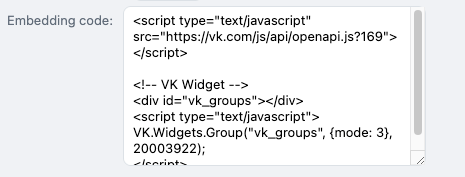
  4. Copy the code.

A screenshot showing the code that is required in order to add the widget to your Wix site.

Step 2 | Embed the code on your site

After you've copied the code from your VK account, return to your site's editor to embed it.

To embed code on your site:

Wix Editor

Studio Editor

  1. Click Add Elements  on the left side of the Editor.

  2. Click Embed Code.

  3. Click Embed HTML.

  4. Paste the code you copied from VKontakte into the Add your code here (HTTPS only) field.

  5. Click Update.

  6. (Optional) Enter alt text that describes what you're embedding in the What's in the embed? Tell Google field.

  7. When ready, publish your site.

Note:

We cannot provide support for external codes that were not created or tested with Wix. If you are experiencing an issue with your code snippet, please contact the provider directly.

Need A Professional Website?
Contact Us 
Today!

Wix Forms: Troubleshooting

Wix Forms: Removing a Form from Your Site

Wix Forms: Saving Your Form Data to Your Contacts

Wix Forms: Creating Automated Email Responses for Form Submissions

Wix Forms: Choosing Who Gets Notified About Form Submissions

Wix Forms: Viewing and Managing a Submissions Table

Wix Forms: Customizing the Success Message and Thank You Page of Site Forms

Wix Forms: Designing Your Site Forms

Wix Forms: Adding a Signature Field

Wix Forms: Protecting Your Site Forms from Spam

Wix Forms: Adding a Subscriber Opt-In Checkbox to a Site Form

Wix Forms: Adding a File Upload Field

Wix Forms: Managing Your Form Fields

Wix Forms: Managing Your Standalone Form Fields

Wix Forms: Translating Your Forms with Wix Multilingual

Wix Forms: Adding and Setting Up a Standalone Form

Wix Forms: Adding and Setting Up a Form on Your Site

Wix Forms: An Overview

Wix Functions: Creating a Custom Loyalty Program Reward

Wix Functions: Adding Custom Validations to Your Forms

Wix Functions: Adding Additional Fees at Checkout

Wix Functions: Creating a Function

Wix Automations: Understanding Conditions Operators

Wix Automations: Using the Run Velo Code Action

Wix Automations: Troubleshooting Wix Automations

Wix Automations: Creating a Multi-Action Automation

Wix Automations: Sending Data via Webhook

Using Zapier to Automate Connections with Third-Party Apps

Wix Automations: Sending Data to Google Sheets

Wix Automations: Managing Your Automations

wix experts
Graphic2Traffic web design
©
bottom of page