


Check-in by Wix for Events
Check-in by Wix: Checking in Guests to an Event
Use the Check-in app to keep track of your guests' attendance with ease.
You can scan their tickets upon arrival for seamless entry. For larger events, simplify the process further by scanning different ticket types, such as VIP or Early Bird, ensuring a smooth and organized check-in experience.
In this article, learn more about:
Before you begin, download the Check-in by Wix app.
Checking in guests to an event
Easily manage guest check-ins for your event by customizing your preferences. You can filter attendees based on ticket type and status, or sort by arrival status for efficient coordination.
Check-in app
Dashboard
Open the Check-in by Wix app.
Tap the relevant event.
Choose what you want to do:
Manually check in a guest
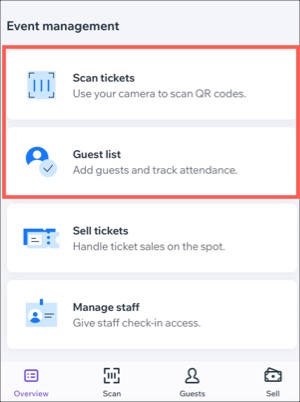
Tap Guest List under Event management.
(Optional) Filter your guest list:Tap the Filter
 icon.
icon.
Choose what you want to sort by: status, ticket type or alphabetically.
Tap Save.
Tap the Checkmark icon
 next to the relevant guest.

Scan a guest's ticket
If your event offers various ticket types (e.g. VIP, Early Bird, Standard), you can streamline guest check-ins by scanning their ticket when they arrive.
Tap Scan tickets under Event management.
Scan the QR code found on event tickets.
Tip: You can choose to scan a specific ticket type by tapping Change next to Scan by ticket type. If you scan the wrong ticket, an error message will pop up, asking if you want to continue scanning that ticket type.
Tip:
You can also use the Wix app to check guests in as they arrive at your event.
FAQs
Click a question to learn more about checking in guests to an event.
I accidentally checked someone in to an event. Can I change their status?
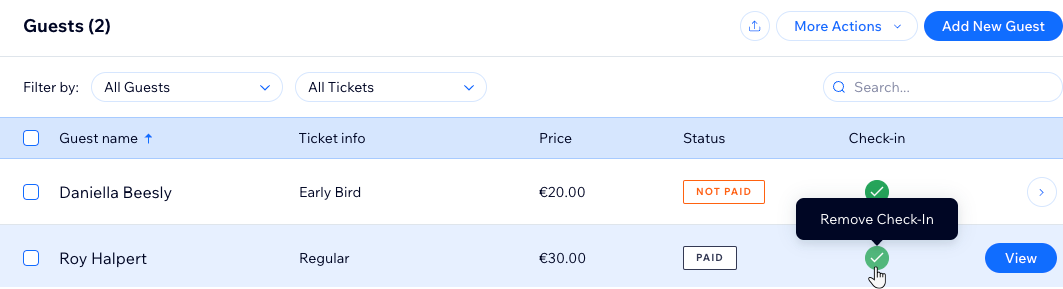
Yes. You can tap next to the relevant guest to update the correct status. For example, if a guest hasn't paid, you can update their status until they pay for their ticket.
From the Check-in by Wix app:
Tap Arrived to change the guest's arrival status.

From your site's dashboard:
Deselect the guest's checkbox under Check-in.
What happens if I try to check in someone who hasn't paid?
If you set up manual payments as a payment option, guests can purchase tickets and pay you offline.
If they go to check in and still haven't paid, you'll receive a pop-up notification that the guest hasn't paid. You can then decide whether to go ahead and check them in, or not.
What happens if I try to check in someone who I manually removed from the guest list?
If you scan the QR code of someone you removed from the guest list, you'll get a notification that the guest was removed. You then have the choice whether to let them check in or not.