


Check-in by Wix for Events
Check-in by Wix: An Overview
Welcome to Check-in by Wix—your mobile solution for seamless event door management.
As an event organizer, you can add staff members to assist with guest check-ins, track ticket sales and ticket scanning at the door. You have complete control over your event, enabling you to accommodate last-minute attendees, sell tickets instantly, and monitor event statistics.
Whether you're an experienced event planner or just starting out, this app is your all-in-one solution to simplify your process and ensure your event runs smoothly from start to finish.

Ready to get started?
Download the Check-in by Wix app right to your mobile device.
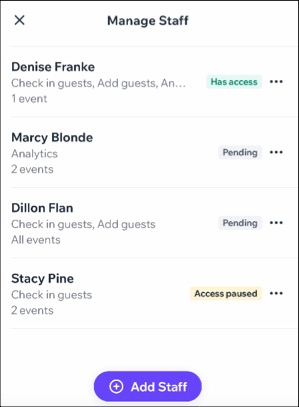
Add and manage staff members
Simplify event door management by adding staff members to your events. Whether it's for all your events or just specific ones, you have the flexibility to assign them as needed. Then, onboard your staff to the app by sending them an invite link or having them scan a QR code.
Once your staff members have access to the app, they can check in guests at the door, scan tickets, or monitor ticket sales, allowing you to focus on managing the event itself.
Check-in and manage your guests
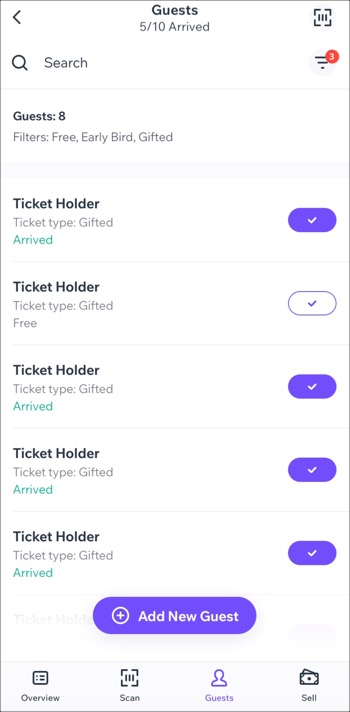
You and your staff can easily scan tickets by type, ensuring a smooth check-in process for guests. Keep your guest list organized for big events using our filters, allowing you to track arrivals based on payment statuses and ticket categories.
Add new guests at your event door
Add new guests on-the-fly at your event door, perfect for situations where your event isn't sold out and you have leftover tickets. Easily accommodate last-minute attendees by swiftly assigning these tickets to new guests.
By filling in those remaining seats, you can maximize attendance as well as your potential revenue.

Sell tickets on the spot with a mobile POS
Sell event tickets at the door or collect in-person payments using our mobile Point of Sale (POS) system. Streamline event lineups with secure, contactless sales on the spot, enabling walk-ins to purchase tickets seamlessly until the last minute.

Keep track of event stats
Gain access to comprehensive statistics for your event such as total sales, tickets sold, and page views. You can track trends over specific time periods to gain insights into guest order information, including purchase times.
This is the perfect tool to identify patterns that can enhance your next event's ticket sales strategy.
