top of page

Changing your Wix Video settings

Wix Video: Allowing Others to Embed Your Video on their Site

Allow your visitors to embed your video on their site or blog using HTML code. It's a great way to show your content to the world!

Important:

  • This option is only available for videos you have uploaded, not videos added from Facebook, Vimeo or YouTube.

  • This option is only available after upgrading to a Premium Plan or for Premium accounts.

To set up the embedding option:

  1. Go to Video Library in your site's dashboard.

  2. Hover over the relevant video and click the Edit icon .

  3. Scroll down to Embed Options.

  4. Click the toggle to enable embedding.

  5. Select the information you wish to display.

Note:

You can add a custom logo to the embedded video, and choose when it appears. The recommended format for your logo is a transparent PNG file, 254 x 152 px.
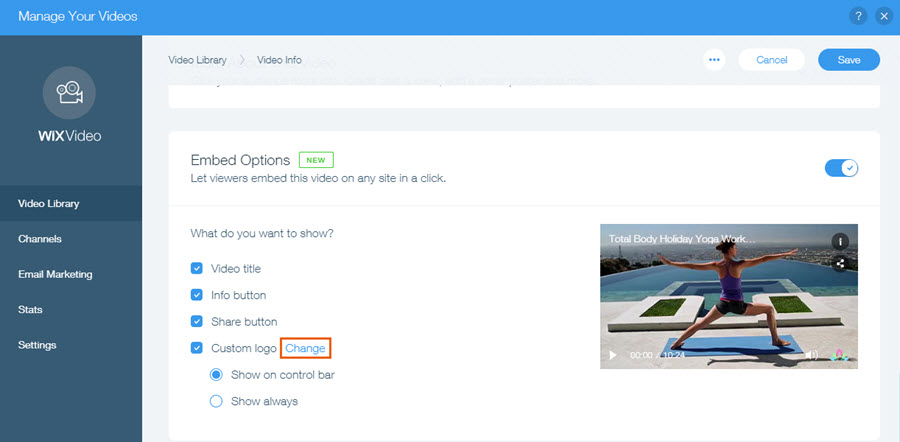
The Change option highlighted next to Custom logo.

After setting up the embed option, visitors watching a video on your site can click the share icon and then access the embed code.

The share and embed buttons being clicked on a video.

Important information about embedded videos

  • When your visitor embeds the video, all the relevant information, including title, cover, action cards, and price appear in the embedded video.

  • If your video is set to allow renting or streaming, viewers will be directed to your Wix site to complete the purchase.

  • Any changes you make to the video's information on your site also appears on the embedded video. However, changes made to the settings, such as changes in fonts and design after embedding the video do not appear in the embedded video.

Embedded videos in mobile friendly view

  • The size of embedded videos in mobile friendly view should be manually adjusted in the html code.
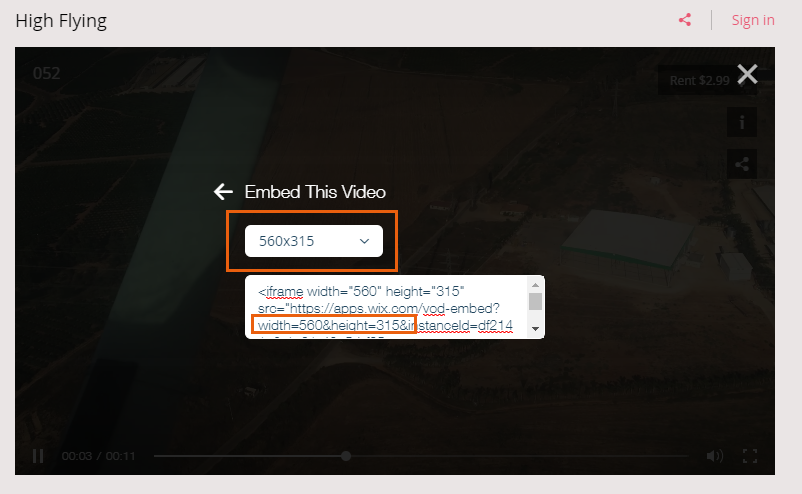
The size indicators highlighted in a video's HTML code.

Need A Professional Website?
Contact Us 
Today!

Wix Invoices: Creating an Invoice

Wix Invoices: About Wix Invoices

Wix Price Quotes: Converting Price Quotes into Invoices

Wix Price Quotes: Managing Your Price Quotes

Wix Price Quotes: Creating a Price Quote

Desktop POS Solutions: Selling to Clients Using POS Checkout

Desktop POS Solutions: Collecting Payment with the Dashboard Card Reader Solution

Desktop POS Solutions: An Overview

Desktop POS Solutions: An Overview

Wix Retail POS: Managing Your Store's Staff

Wix Retail POS: Managing Shift Management for Team Members

Wix Retail POS: Managing Your Customer List

Wix Retail POS: Viewing Your Sales Report

Wix Retail POS: Managing Your Sales History

Wix Retail POS: Creating Invoices

Wix Retail POS: Accepting Exchanges from Customers

Wix Retail POS: Issuing Refunds

Wix Retail POS: Managing Business Locations

Wix Retail POS: Services Displayed on the Retail POS Tablet

Wix Retail POS: Accepting Payment for a Booked Session

Wix Retail POS: Booking Services and Accepting Payment

Wix Retail POS: About Purchase Orders

Wix Retail POS: Offering Shipping or Delivery

Wix Retail POS: Managing Out-of-Stock Inventory

Wix Retail POS: Setting Product Visibility for POS and Desktop

Wix Retail POS: Managing Your Store Catalog

Wix Retail POS: Creating Product Categories

Wix Retail POS: Adding New Products to the Catalog

Wix Retail POS: Selling Store Products at Your POS

Wix Retail POS: Customizing Printed Receipts

wix experts
Graphic2Traffic web design
©
bottom of page