top of page

Setting up your store

Wix Stores: Setting Up a 301 Redirect to a Specific Product Page

With Wix Stores, you can edit the URL of your product page under the product's SEO Settings.

You may decide to do this if you changed the name of one of your products. To make sure that you don't have any broken links, you can create 301 redirects from the old product URLs to the new ones. Learn more about 301 Redirects.

Tip:

If you moved your site to Wix, and you need to change the path for a group of URLs (e.g. mystunningwebsite.com/products/product-name -> mystunningwebsite.com/product-page/product-name), you can use a group redirect instead. Learn More

To set up 301 redirects for your product pages:

  1. Go to Search Engine Optimization (SEO) in your site's dashboard.

  2. Scroll down to Tools and settings.

  3. Select Go to URL Redirect Manager.

  4. Click + New Redirect.

  5. Select Single redirect.

  6. Enter the old product page URL you want to redirect from, (e.g., /product-page/cactus) under Old URL.

  7. Start typing the new URL and select it from the drop-down (e.g., /product-page/succulent).

  8. Click Save to finish or click Save & Add Another to add more.
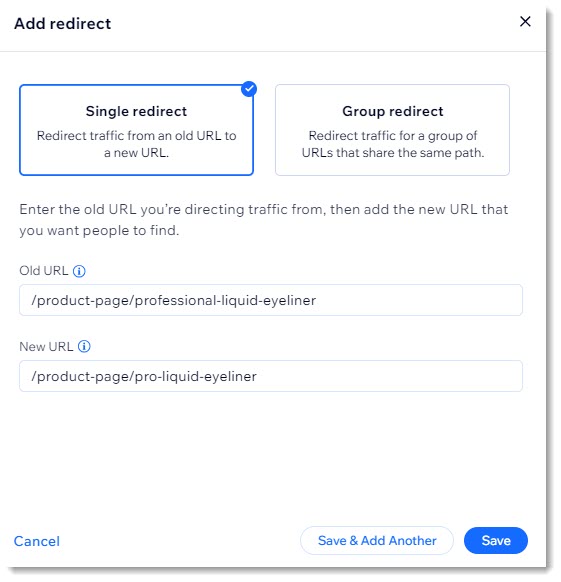
Screenshot of the 301 redirect page in the Wix dashboard

Need A Professional Website?
Contact Us 
Today!

Wix Retail POS: Using the Stripe Reader M2 Card Reader

Wix Retail POS: Using the BBPOS WisePad 3 Card Reader

Wix Retail POS: Selecting a Card Reader

Wix Retail POS: About Your HP Tablet

Wix Retail POS: Connecting Your POS Hardware

Wix Retail POS: About Wix POS for Your Brick and Mortar Business

Wix Mobile POS: Setting Up a Point of Sale with SumUp

Wix Mobile POS: Setting Up a Point of Sale with Square

Wix Restaurants POS: Selling Restaurant Items at a Mobile Point of Sale

Wix Pricing Plans POS: Selling Plans at a Mobile Point of Sale

Wix Events POS: Selling Event Tickets at a Mobile Point of Sale

Wix Bookings POS: Booking Services and Accepting Payments with the Wix App

Wix Bookings POS: Accepting Payment for Booked Services at a Mobile Point of Sale

Wix Stores POS: Managing Inventory for Mobile POS Sales

Wix Stores POS: Setting up Tax Rules for a Mobile Point of Sale

Wix Stores POS: Selling Products at a Mobile Point of Sale

Wix Mobile POS: Customizing Receipts

Wix Mobile POS: Selling Physical Gift Cards at a Mobile POS

Wix Mobile POS: Redeeming Virtual Gift Cards at a Mobile POS

Wix Mobile POS: Setting Up Receipt Printing

Wix Mobile POS: Collecting Tips

Wix Mobile POS: Understanding Invoices for Mobile POS Transactions

Wix Mobile POS: Setting Up Tap to Pay

Wix Mobile POS: Letting Staff Members Accept Payments

Wix Mobile POS: Charging Clients at a Point of Sale

Wix Mobile POS: Setting Up a Point of Sale

Wix Mobile POS: An Overview

Collecting the Colorado Retail Delivery Fee

Accessing the Avalara Dashboard

Including Tax in the Product Price

wix experts
Graphic2Traffic web design
©
bottom of page