top of page

Promoting stores sales

Wix Stores: Managing Your Coupons

Manage your coupons by activating the ones you want to offer customers and deactivating or deleting coupons you don't want to make available.

Note:

If you delete or deactivate a coupon, your customers won't be able to redeem it while checkout out.

Activating or deactivating a coupon

You can save time by creating a coupon once and then reusing it when needed. For example, you can create a Summer Sale Coupon and deactivate it when the sale it over. When summer rolls around again, just click the toggle to activate it.
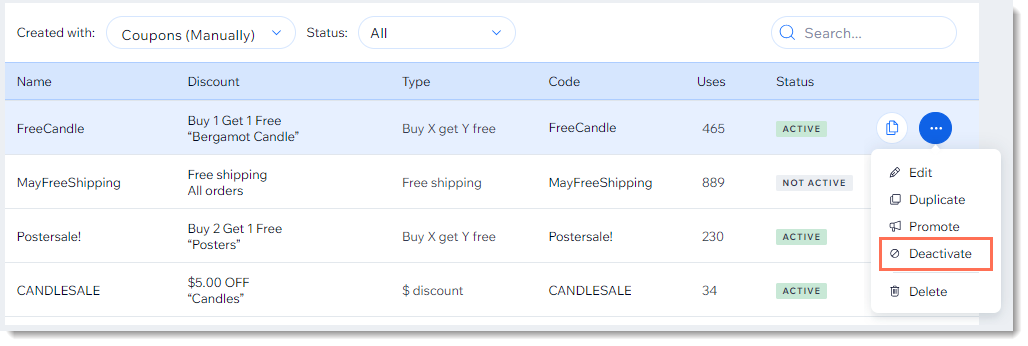
Screenshot of the coupon list in the Wix dashboard with the deactivate coupon option outlined

  1. Go to Coupons in your site's dashboard.

  2. Click the More Actions icon    next to the relevant coupon.

  3. Click Activate or Deactivate.

Deleting a coupon

Keep your Coupons page clean by deleting coupons that can no longer be used.

Note:

Once you delete a coupon, you can't undo this action. You can, however, recreate a coupon with the same details.
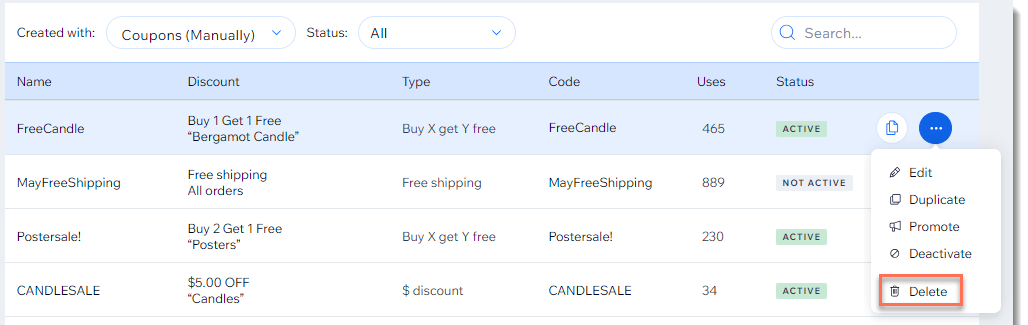
Screenshot of the coupon list in the Wix dashboard with the Delete  option outlined

To delete a coupon:

  1. Go to Coupons in your site's dashboard.

  2. Click the More Actions icon   at the top right of the coupon you want to delete.

  3. Click Delete.

  4. Click Yes, Delete to confirm.

Need A Professional Website?
Contact Us 
Today!

Wix Retail POS: Using the Stripe Reader M2 Card Reader

Wix Retail POS: Using the BBPOS WisePad 3 Card Reader

Wix Retail POS: Selecting a Card Reader

Wix Retail POS: About Your HP Tablet

Wix Retail POS: Connecting Your POS Hardware

Wix Retail POS: About Wix POS for Your Brick and Mortar Business

Wix Mobile POS: Setting Up a Point of Sale with SumUp

Wix Mobile POS: Setting Up a Point of Sale with Square

Wix Restaurants POS: Selling Restaurant Items at a Mobile Point of Sale

Wix Pricing Plans POS: Selling Plans at a Mobile Point of Sale

Wix Events POS: Selling Event Tickets at a Mobile Point of Sale

Wix Bookings POS: Booking Services and Accepting Payments with the Wix App

Wix Bookings POS: Accepting Payment for Booked Services at a Mobile Point of Sale

Wix Stores POS: Managing Inventory for Mobile POS Sales

Wix Stores POS: Setting up Tax Rules for a Mobile Point of Sale

Wix Stores POS: Selling Products at a Mobile Point of Sale

Wix Mobile POS: Customizing Receipts

Wix Mobile POS: Selling Physical Gift Cards at a Mobile POS

Wix Mobile POS: Redeeming Virtual Gift Cards at a Mobile POS

Wix Mobile POS: Setting Up Receipt Printing

Wix Mobile POS: Collecting Tips

Wix Mobile POS: Understanding Invoices for Mobile POS Transactions

Wix Mobile POS: Setting Up Tap to Pay

Wix Mobile POS: Letting Staff Members Accept Payments

Wix Mobile POS: Charging Clients at a Point of Sale

Wix Mobile POS: Setting Up a Point of Sale

Wix Mobile POS: An Overview

Collecting the Colorado Retail Delivery Fee

Accessing the Avalara Dashboard

Including Tax in the Product Price

wix experts
Graphic2Traffic web design
©
bottom of page