top of page

Managing products and categories

Wix Stores: Allowing Customers to Add a Message When Purchasing a Product

Add a custom text box to your Product Page so that your customers can leave you a message when they purchase a specific product. This could be used to add personalization options to products, or for adding gift wrap options.
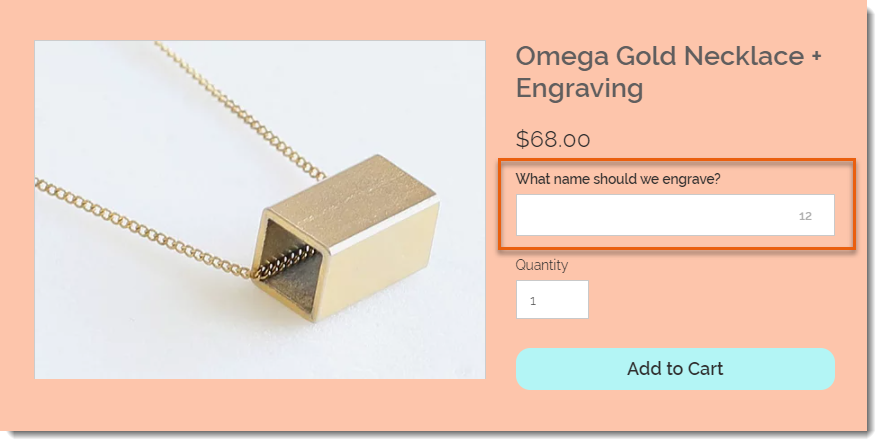
Screenshot of a product displayed on the product page in a Wix stores with a customer message field outlined

To add a custom text field to your Product Page:

  1. Go to Products in your site's dashboard.

  2. Select the relevant product or click New Product to add a new one.

  3. Scroll down and click Add Custom Text Field.

  4. Enter the title of the text field (e.g. What name should we engrave?).

  5. Enter the character limit for the text field.

  6. Select or deselect the Mandatory field checkbox:Selected: The customer must fill in the text field.
    Deselected: The customer can leave it blank.

  7. (Optional) Click Add Another to add a second custom text field.
    Tip: You can add up to 2 fields.

  8. Click Save.

After a customer makes an order, you can see the information they wrote in the Orders tab.
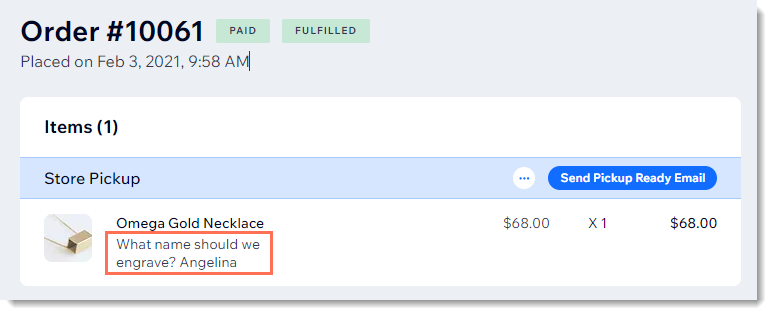
Screenshot of a store order in the Wix dashboard with a customer's message outlined

Need A Professional Website?
Contact Us 
Today!

Wix Invoices: Creating an Invoice

Wix Invoices: About Wix Invoices

Wix Price Quotes: Converting Price Quotes into Invoices

Wix Price Quotes: Managing Your Price Quotes

Wix Price Quotes: Creating a Price Quote

Desktop POS Solutions: Selling to Clients Using POS Checkout

Desktop POS Solutions: Collecting Payment with the Dashboard Card Reader Solution

Desktop POS Solutions: An Overview

Desktop POS Solutions: An Overview

Wix Retail POS: Managing Your Store's Staff

Wix Retail POS: Managing Shift Management for Team Members

Wix Retail POS: Managing Your Customer List

Wix Retail POS: Viewing Your Sales Report

Wix Retail POS: Managing Your Sales History

Wix Retail POS: Creating Invoices

Wix Retail POS: Accepting Exchanges from Customers

Wix Retail POS: Issuing Refunds

Wix Retail POS: Managing Business Locations

Wix Retail POS: Services Displayed on the Retail POS Tablet

Wix Retail POS: Accepting Payment for a Booked Session

Wix Retail POS: Booking Services and Accepting Payment

Wix Retail POS: About Purchase Orders

Wix Retail POS: Offering Shipping or Delivery

Wix Retail POS: Managing Out-of-Stock Inventory

Wix Retail POS: Setting Product Visibility for POS and Desktop

Wix Retail POS: Managing Your Store Catalog

Wix Retail POS: Creating Product Categories

Wix Retail POS: Adding New Products to the Catalog

Wix Retail POS: Selling Store Products at Your POS

Wix Retail POS: Customizing Printed Receipts

wix experts
Graphic2Traffic web design
©
bottom of page