top of page

Table reservations

Wix Restaurants: Setting Up Prepayment for Table Reservations

Set up prepayment rules for reservations for larger groups or individual guests. Accept credit card payments when guests book online. With automatic approval, customers are charged immediately.

With manual approval, customers aren’t charged right away. After approval, charge them by sharing a payment link, sending an invoice, or handling the payment directly. Plus, you can access detailed analytics for all your table reservation payments.
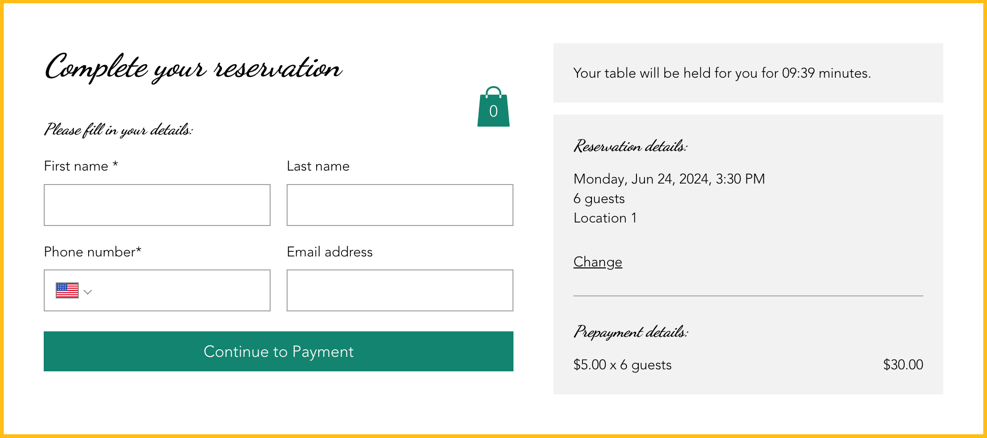
A screenshot of how prepayment appears when a customer reserves a table.

Adding a payment rule

Reduce last minute cancellations by collecting payment upfront. This helps reduce no shows and minimize last minute cancellations.

You can do this from your site's dashboard or straight from the Wix app on your mobile device.

To add a payment rule:

Dashboard

Wix app

  1. Go to Table Reservations in your site's dashboard.

  2. Click Settings at the top right.

  3. Click Prepayment.

  4. Click + Add Prepayment and define your prepayment rules:Party Size: Enter the minimum number of guests the fee applies to.
    Charge Fee: Enter the fee to charge each guest for this reservation.

  5. Click Save.

A screenshot of defining your prepayment rules for table reservations.

FAQs

Click a question below to learn more.

Can I customize the table reservation form?

Customize your table reservation form to include information about your table reservation fees for your guests.

How do I change the currency on my site?

To change the currency on your site, go to language & region in your site's dashboard.

How do I set up tax?

To set up tax for your site, go to tax in your site's dashboard.

Need A Professional Website?
Contact Us 
Today!

Wix Retail POS: Using the Stripe Reader M2 Card Reader

Wix Retail POS: Using the BBPOS WisePad 3 Card Reader

Wix Retail POS: Selecting a Card Reader

Wix Retail POS: About Your HP Tablet

Wix Retail POS: Connecting Your POS Hardware

Wix Retail POS: About Wix POS for Your Brick and Mortar Business

Wix Mobile POS: Setting Up a Point of Sale with SumUp

Wix Mobile POS: Setting Up a Point of Sale with Square

Wix Restaurants POS: Selling Restaurant Items at a Mobile Point of Sale

Wix Pricing Plans POS: Selling Plans at a Mobile Point of Sale

Wix Events POS: Selling Event Tickets at a Mobile Point of Sale

Wix Bookings POS: Booking Services and Accepting Payments with the Wix App

Wix Bookings POS: Accepting Payment for Booked Services at a Mobile Point of Sale

Wix Stores POS: Managing Inventory for Mobile POS Sales

Wix Stores POS: Setting up Tax Rules for a Mobile Point of Sale

Wix Stores POS: Selling Products at a Mobile Point of Sale

Wix Mobile POS: Customizing Receipts

Wix Mobile POS: Selling Physical Gift Cards at a Mobile POS

Wix Mobile POS: Redeeming Virtual Gift Cards at a Mobile POS

Wix Mobile POS: Setting Up Receipt Printing

Wix Mobile POS: Collecting Tips

Wix Mobile POS: Understanding Invoices for Mobile POS Transactions

Wix Mobile POS: Setting Up Tap to Pay

Wix Mobile POS: Letting Staff Members Accept Payments

Wix Mobile POS: Charging Clients at a Point of Sale

Wix Mobile POS: Setting Up a Point of Sale

Wix Mobile POS: An Overview

Collecting the Colorado Retail Delivery Fee

Accessing the Avalara Dashboard

Including Tax in the Product Price

wix experts
Graphic2Traffic web design
©
bottom of page