top of page

Selling and promoting your music

Wix Music: Setting Up Your Payment Methods

Your fans can buy your music in Wix Music and Wix does not charge a cent.

Important:

  • Set up your payment methods by following the steps below before selling your music.

  • The album should not be edited after a purchase is made as this can cause an error with the download link.

To set up your payments:

  1. Go to Accept Payments in your site's dashboard.

  2. Set up the payment methods you want to use.

To change your currency:

  1. Go to Music Library in your site's dashboard.

  2. Hover over the relevant single/album/playlist and click the More Actions icon.

  3. Click Edit.

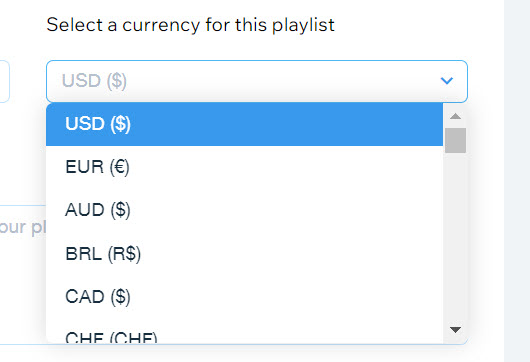
  4. Click the drop-down under Select a currency for this playlist.

  5. Select a currency.

  6. Click Save.

A screenshot of the currency selection drop-down menu.

Notes:

  • Currently, the following payment processors are not supported with Wix Music:pagueloFacil
    Isracard
    Offline.

  • For Wix Payments, there is a minimum amount of $1 per transaction. Make sure your release/track/album's price is over $1 if you're using this payment processor.

Need A Professional Website?
Contact Us 
Today!

Customizing Login Settings in the Shared Gallery App

Managing Permissions in the Shared Gallery App

Deleting Photos in the Shared Gallery App

Uploading Photos and Videos to the Shared Gallery App

Creating and Managing Albums in the Shared Gallery App

Adding and Setting Up the Shared Gallery App

The Shared Gallery App: An Overview

Wix Apps: Hiding a Private Folder

Wix Apps: Sharing Files on Multiple Site Pages

Wix Apps: Connecting a Pricing Plan to a File Share Folder

Wix Apps: Managing Permissions Per Folder in the Wix File Share App

Wix Apps: Supported File Types for the Wix File Share App

Wix Apps: Deleting the File Share App

Wix Apps: Customizing Login Settings in the File Share App

Wix Apps: Using the Member's Area with the File Share App

Wix Apps: Managing Library Permissions in the File Share App

Wix Apps: Managing Files and Folders in the File Share App

Wix Apps: Creating Folders in the File Share App

Wix Apps: Uploading Files to the File Share App

Wix Apps: Adding and Setting Up the File Share App

Wix Apps: About the File Share App

Wix Hotels by HotelRunner: Connecting Airbnb iCal to Your Site

Wix Hotels by HotelRunner: Connecting HomeAway to Your Site

Connecting Goibibo & MakeMyTrip to Wix Hotels by HotelRunner

Wix Hotels by HotelRunner: Connecting VRBO to Your Site

Wix Hotels by HotelRunner: Connecting Pitchup.com to Your Site

Wix Hotels by HotelRunner: Connecting Agoda to Your Site

Wix Hotels by HotelRunner: Upgrading Wix Hotels by HotelRunner

Wix Hotels by HotelRunner: Connecting Airbnb to Your Site

Wix Hotels by HotelRunner: Connecting Expedia to Your Site

wix experts
Graphic2Traffic web design
©
bottom of page