top of page

Shared Gallery

Customizing Login Settings in the Shared Gallery App

With the Shared Gallery app, you can create beautiful galleries on your site to share photos and videos with your community.

Visitors to your site can sign up to become members and join your community. You can select to let your members upload media, create and manage albums, and manage your gallery. Learn more about Shared Gallery permissions

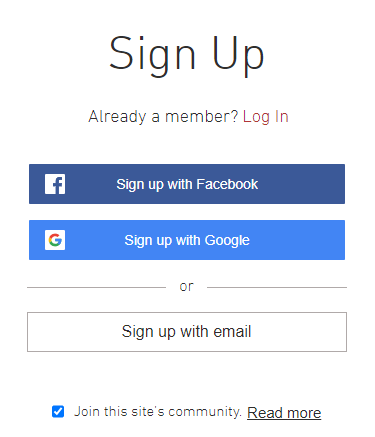
Customize your login page to control who can become a member, which login page visitors see first, which credentials they can use, and which policy links that visitors see on your login page.
To customize your login page settings:

Wix Editor

Studio Editor

  1. Go to your editor.

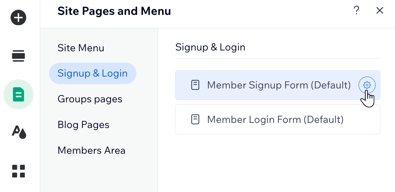
  2. Click Pages & Menu  on the left side of the editor.

  3. Click Signup & Login.

  4. Click Member Signup Form (Default).

  1. Customize the settings available on the General, Social & Community and Policies tabs.

Tip

Learn more about customizing your Member Signup Form settings.

Want to create your own customized signup form?

Select Custom Form from the Which member signup form do your visitors see? drop-down, then click Edit Custom Signup form to get started. Learn more about custom signup forms

Need A Professional Website?
Contact Us 
Today!

Wix Chat: Automatically Sending Chat Messages or Responding to Chat Messages

Wix Chat: About Notifications

Wix Chat: Deleting Wix Chat

Wix Chat: Adding the WhatsApp Channel to Your Chatbox

Wix Chat: Viewing and Chatting with Live Site Visitors

Wix Chat: Customizing the Chat Icon on Your Mobile Site

Wix Chat: Translating Wix Chat

Wix Chat: Allowing Members to Chat with Each Other Using Members Chat

Wix Chat: Customizing Your Chat Settings

Wix Chat: Designing Your Chatbox

Wix Chat: Adding Wix Chat to Your Site

Wix Chat: An Overview

Your AI Site-Chat Conversations Quota

Designing and Customizing Wix AI Site-Chat

Training Your AI Site-Chat

Testing Your Wix AI Site-Chat

Adding and Setting Up Wix AI Site-Chat

About Wix AI Site-Chat

Wix Inbox: Sending a Broadcast Message to Your Contacts in the Wix App

Wix Inbox: Working with Site Collaborators

Wix Inbox: Connecting WhatsApp Business to Inbox

Wix Inbox: Connecting Your Facebook Page

Wix Inbox: Connecting Instagram to Inbox

Wix Inbox: About Wix Inbox Channels

Wix Inbox: Connecting Your Gmail Account

Wix Inbox: Managing Your Notification Settings

Wix Inbox: Managing Your Inbox

Wix Inbox: Setting Up Your Inbox Profile and Outgoing Emails

Wix Inbox: Sending Messages and Attaching Items

Wix Inbox: An Overview

wix experts
Graphic2Traffic web design
©
bottom of page