top of page

File Share

Wix Apps: Hiding a Private Folder

With the Wix File Share app, you can hide certain folders from view so that only members with the required permissions can view them. You can always unhide the folder later if you need to.

Note:

Hiding a folder from view requires changing the permissions so that it's no longer a public folder, visible to all your members.

To hide a private folder:

  1. Go to File Share in your site's dashboard.

  2. Click the More Actions icon  next to the relevant folder.

  3. Click Permissions.

  4. Click the drop-down next to All members and select Remove.

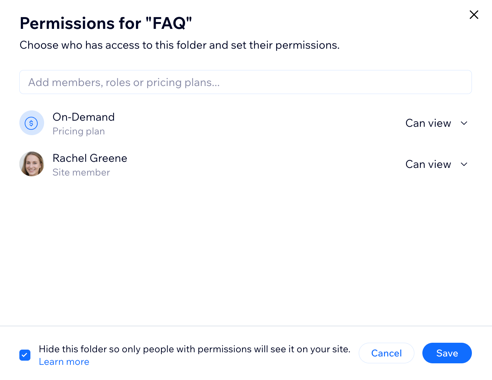
  5. Select the checkbox at the bottom of the pop-up to hide the folder.

  6. Set up the new permissions for this folder:Use the search bar to find a specific member, role or pricing plan.
    Choose their permission level from the drop-down: Can view, Can upload or Can manage.
    Select or deselect the checkbox next to Notify members.
    Click Add / Add & Notify.

  7. Click Save.

A screenshot showing the option to hide the folder from view.

Need A Professional Website?
Contact Us 
Today!

Wix Chat: Automatically Sending Chat Messages or Responding to Chat Messages

Wix Chat: About Notifications

Wix Chat: Deleting Wix Chat

Wix Chat: Adding the WhatsApp Channel to Your Chatbox

Wix Chat: Viewing and Chatting with Live Site Visitors

Wix Chat: Customizing the Chat Icon on Your Mobile Site

Wix Chat: Translating Wix Chat

Wix Chat: Allowing Members to Chat with Each Other Using Members Chat

Wix Chat: Customizing Your Chat Settings

Wix Chat: Designing Your Chatbox

Wix Chat: Adding Wix Chat to Your Site

Wix Chat: An Overview

Your AI Site-Chat Conversations Quota

Designing and Customizing Wix AI Site-Chat

Training Your AI Site-Chat

Testing Your Wix AI Site-Chat

Adding and Setting Up Wix AI Site-Chat

About Wix AI Site-Chat

Wix Inbox: Sending a Broadcast Message to Your Contacts in the Wix App

Wix Inbox: Working with Site Collaborators

Wix Inbox: Connecting WhatsApp Business to Inbox

Wix Inbox: Connecting Your Facebook Page

Wix Inbox: Connecting Instagram to Inbox

Wix Inbox: About Wix Inbox Channels

Wix Inbox: Connecting Your Gmail Account

Wix Inbox: Managing Your Notification Settings

Wix Inbox: Managing Your Inbox

Wix Inbox: Setting Up Your Inbox Profile and Outgoing Emails

Wix Inbox: Sending Messages and Attaching Items

Wix Inbox: An Overview

wix experts
Graphic2Traffic web design
©
bottom of page