top of page

Selling and promoting your music

Wix Music: Viewing Your Transactions

Wix Music lets you sell the music you make directly on your site. You can view all of your sales in one place, making it easy to track your earnings and stay up to date on your fans' activity.

In this article, learn about:

Viewing your transactions

The Payments page in your site's dashboard shows a list of any transaction your visitors made. Click a transaction to see information like the amount, who made the payment, and its current status.

To view transactions:

  1. Go to Payments in your site's dashboard.

  2. Click the relevant payment to see more information.
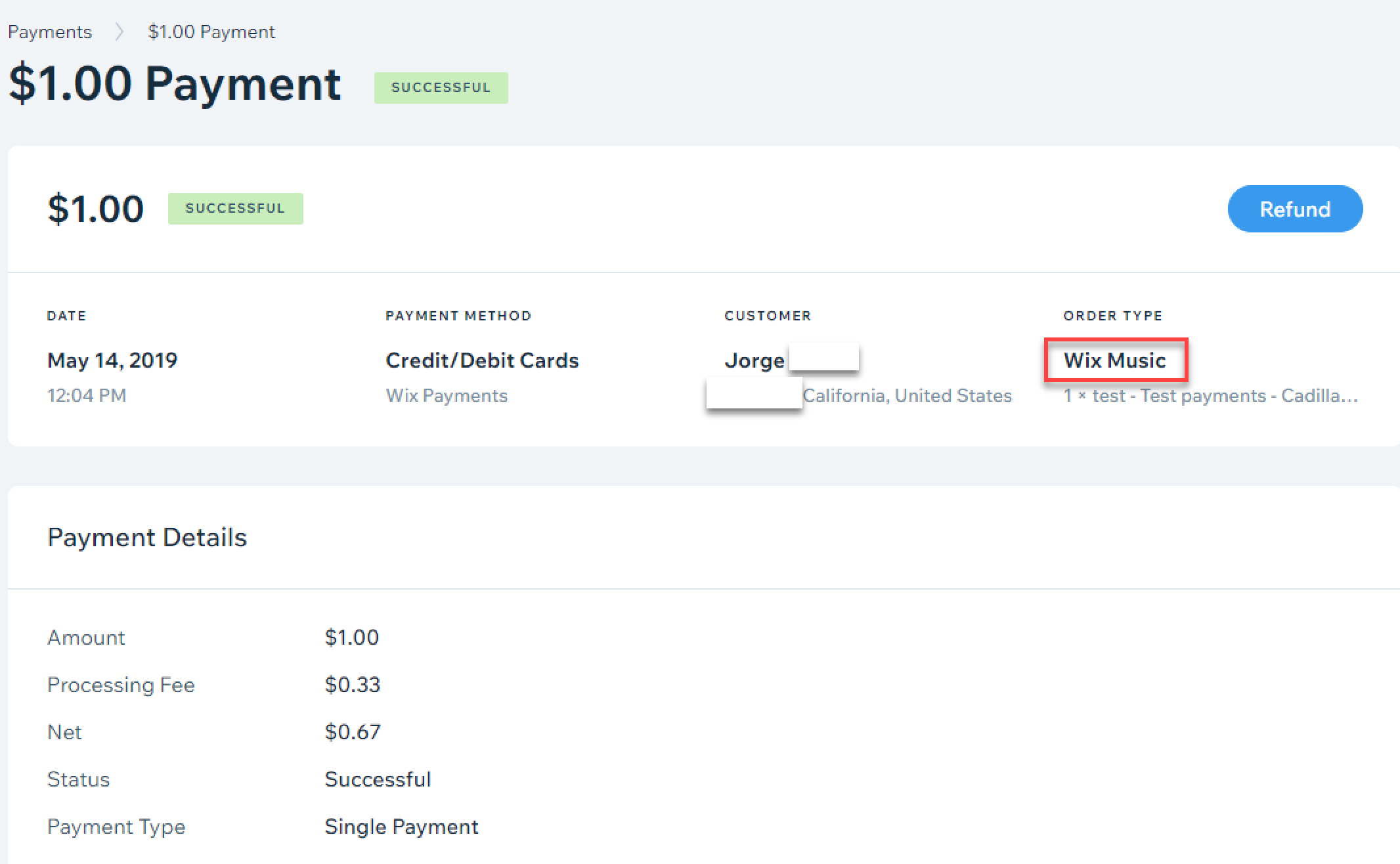
A screenshot of the payment menu with Wix Music highlighted as the order type.

Need to refund a customer?

If you're using Wix Payments, you can click Refund at the top right, when viewing a transaction, to issue a refund. For other providers, see this article about issuing refunds with third-party payment providers.

Filtering your transactions

You can filter the list on the Payments page by date, status, payment provider/method, and order type. This is a great way to find a specific transaction quickly, without having to go through each one.

To filter your transactions:

  1. Go to Payments in your site's dashboard.

  2. Click Filter.

  3. Select the checkbox next to the filter(s) you want to apply.

Tip:

Selling other products or services on your site? You can filter the list to only show Wix Music transactions. Select Wix Music as the Order Type.
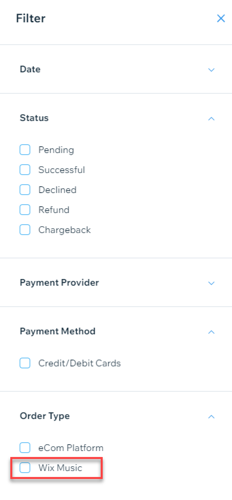
A screenshot of the available filters for transactions, with Wix Music highlighted as the order type.

Need A Professional Website?
Contact Us 
Today!

Wix Invoices: Creating an Invoice

Wix Invoices: About Wix Invoices

Wix Price Quotes: Converting Price Quotes into Invoices

Wix Price Quotes: Managing Your Price Quotes

Wix Price Quotes: Creating a Price Quote

Desktop POS Solutions: Selling to Clients Using POS Checkout

Desktop POS Solutions: Collecting Payment with the Dashboard Card Reader Solution

Desktop POS Solutions: An Overview

Desktop POS Solutions: An Overview

Wix Retail POS: Managing Your Store's Staff

Wix Retail POS: Managing Shift Management for Team Members

Wix Retail POS: Managing Your Customer List

Wix Retail POS: Viewing Your Sales Report

Wix Retail POS: Managing Your Sales History

Wix Retail POS: Creating Invoices

Wix Retail POS: Accepting Exchanges from Customers

Wix Retail POS: Issuing Refunds

Wix Retail POS: Managing Business Locations

Wix Retail POS: Services Displayed on the Retail POS Tablet

Wix Retail POS: Accepting Payment for a Booked Session

Wix Retail POS: Booking Services and Accepting Payment

Wix Retail POS: About Purchase Orders

Wix Retail POS: Offering Shipping or Delivery

Wix Retail POS: Managing Out-of-Stock Inventory

Wix Retail POS: Setting Product Visibility for POS and Desktop

Wix Retail POS: Managing Your Store Catalog

Wix Retail POS: Creating Product Categories

Wix Retail POS: Adding New Products to the Catalog

Wix Retail POS: Selling Store Products at Your POS

Wix Retail POS: Customizing Printed Receipts

wix experts
Graphic2Traffic web design
©
bottom of page