top of page

Creating Your Services

Wix Bookings: Making Services Unbookable

You may want to prevent clients from booking services. To do so, you have a number of options:

In this article, learn how to:

Creating a view-only service

A view-only service shows site visitors all the relevant information about your service, but displays a "More Info" button instead of a "Book It" button. The service cannot be booked through your site.

Learn how to create view-only services.
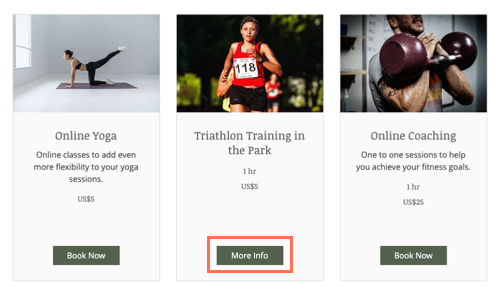
A screenshot showing the More Info button on the service page, instead of the book now button.

Requiring approval for appointments in Wix Bookings

You can let clients put in a booking request, and then approve or decline it. This give you complete control over which bookings you want to accept.

Learn how to require approval for appointments.

A screenshot showing the request to book button on the service page.

Hiding a service from your site

If you don't want clients to view a service, you can hide it from your site. When you're ready, you can unhide the service to allow clients to book.

To hide a service from your site:

  1. Go to Booking Services in your site's dashboard.

  2. Hover over the relevant service.

  3. Click the More Actions icon and select Hide from site.

A screenshot showing how to hide a service in the Bookings Services tab of the dashboard.

Note:

Hiding a service does not cancel existing bookings. Learn how to cancel sessions and refund your clients.

Deleting a service

If you no longer want to offer a particular service, you can delete it. If the service is connected to a pricing plan (a membership plan or package), deleting the service disconnects it.

Learn how to delete a service from your site.

A screenshot of how to delete a service in the Bookings Services tab of the dashboard.

Need A Professional Website?
Contact Us 
Today!

Wix Invoices: Creating an Invoice

Wix Invoices: About Wix Invoices

Wix Price Quotes: Converting Price Quotes into Invoices

Wix Price Quotes: Managing Your Price Quotes

Wix Price Quotes: Creating a Price Quote

Desktop POS Solutions: Selling to Clients Using POS Checkout

Desktop POS Solutions: Collecting Payment with the Dashboard Card Reader Solution

Desktop POS Solutions: An Overview

Desktop POS Solutions: An Overview

Wix Retail POS: Managing Your Store's Staff

Wix Retail POS: Managing Shift Management for Team Members

Wix Retail POS: Managing Your Customer List

Wix Retail POS: Viewing Your Sales Report

Wix Retail POS: Managing Your Sales History

Wix Retail POS: Creating Invoices

Wix Retail POS: Accepting Exchanges from Customers

Wix Retail POS: Issuing Refunds

Wix Retail POS: Managing Business Locations

Wix Retail POS: Services Displayed on the Retail POS Tablet

Wix Retail POS: Accepting Payment for a Booked Session

Wix Retail POS: Booking Services and Accepting Payment

Wix Retail POS: About Purchase Orders

Wix Retail POS: Offering Shipping or Delivery

Wix Retail POS: Managing Out-of-Stock Inventory

Wix Retail POS: Setting Product Visibility for POS and Desktop

Wix Retail POS: Managing Your Store Catalog

Wix Retail POS: Creating Product Categories

Wix Retail POS: Adding New Products to the Catalog

Wix Retail POS: Selling Store Products at Your POS

Wix Retail POS: Customizing Printed Receipts

wix experts
Graphic2Traffic web design
©
bottom of page