


Customizing Wix Bookings pages
Wix Bookings: Customizing Your Thank You Page
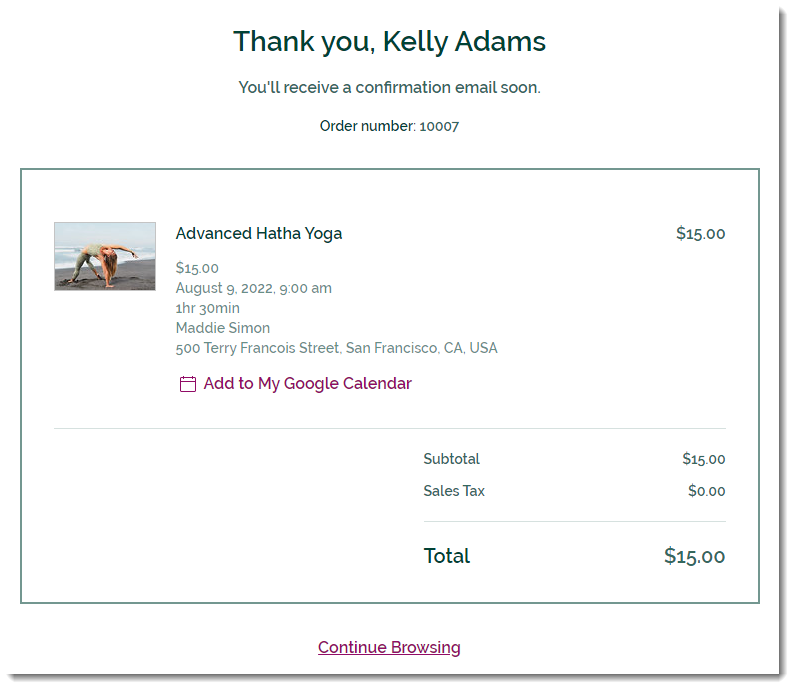
The Thank You Page is the page customers are directed to after they complete a purchase. It includes a thank you message and your client's order number, the service booked, the price, and more.
In this article, learn more about:
Customizing the Thank You Page Element
You can personalize your Thank You page to match your site's look and brand. Choose which elements to display on this page, edit the text and design the page to your liking.

Wix Editor
Studio Editor
Go to your Thank You Page:Click Pages & Menu
 on the left side of the editor.
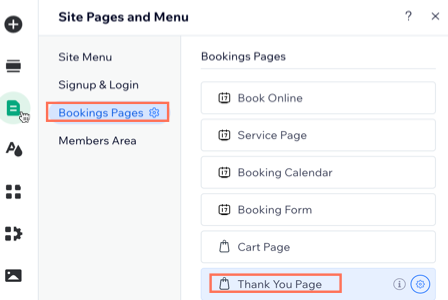
Click Bookings Pages.
Note: If you also have Wix Stores, access the Thank You Page by clicking Cart & Thank You.
Click the Thank You Page.
Click the Thank You Page element on your page.
Click Settings.
Set up the Thank You Page using these options:Settings: Deselect the checkboxes next to any elements you don't want to display.
Design: Customize the Thank You Page background and borders, as well as the text fonts and colors.
Text: Edit the text that appears on the Thank You Page:General Text: Edit the title, subtitle, and various labels.
Order with Subscription: Edit the title, subtitle, and subscription label that appear when customers purchase a subscription.
Link: Edit the Continue Browsing link text and choose where the link takes visitors.
FAQs
Click below to learn more about your Thank You Page.
What happens if my customer pays with Express Checkout (e.g. PayPal or Apple Pay)?
If a customer pays with Express Checkout (e.g. PayPal or Apple Pay), they are directed to PayPal's own confirmation page. From there, they can click to go back to your store's Thank You Page.
Can I remove information from my Thank You Page?
Currently, the Thank You Page always displays the delivery charge and the price breakdown. You can remove the order number, product image, or the "Continue Browsing" link.
If you would like to have the ability to remove more info from the Thank You Page, you can vote for it here.
Can I customize the layout of my Thank You Page?
Currently, it's not possible to customize the Thank You Page layout.
If you would like to see this feature in the future, you can vote for it here.
Can I edit all the text on my Thank You Page?
Currently, it's possible to edit most of the text that appears on the Thank You Page. However, some text, such as the words "subtotal", "delivery", or "note", cannot currently be changed.