top of page

Setting up Pricing Plans

Pricing Plans: Allowing Guest Checkout on Your Site

Let visitors to your site buy your pricing plans without having to sign up or log in. Enabling guest checkout makes it easier for site visitors to become loyal customers.

In this article, learn more about:

Enabling guest checkout for pricing plans

Enable guest checkout to let visitors sample your pricing plans, without becoming full members of your site right away.

Visitors who go through guest checkout automatically become contacts. They also receive an email with a link to create a member profile on your site, so they can access the Members Area.

Notes:

  • For plans that include online content and services, visitors need to create their member profile up to gain access.

  • Guest checkout is only available to customers on the Plans & Pricing page on your site.

To enable guest checkout:

  1. Go to Pricing Plans Settings in your site's dashboard.

  2. Click the Checkout tab.

  3. Click to enable the Guest checkout toggle.
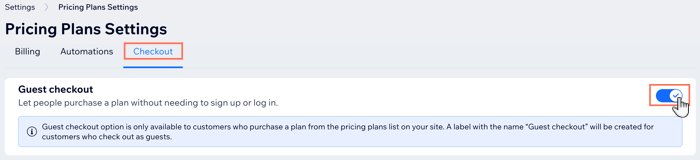
A screenshot of the pricing plans settings page where you can enable guest checkout

How guest checkout looks on your site

After you enable guest checkout, site visitors can buy your plans without signing up to become a site member. They begin by choosing the plan they want to buy. Then, they have the option of logging in or continuing as a guest.
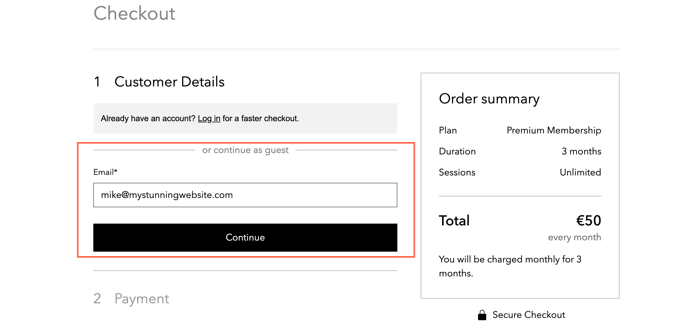
A screenshot of purchasing a pricing plan as a guest, without signing up as members

Visitors then enter their payment details as normal and continue.
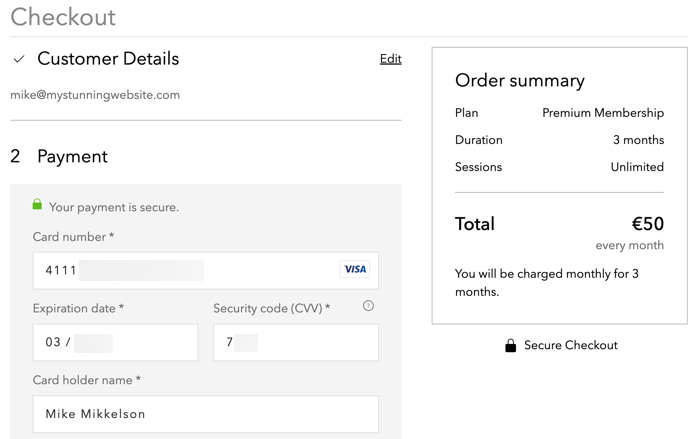
A screenshot of the checkout process when paying as a guest

When payment is complete, they receive an email with the details of their purchase. The email contains a link which allows your customers to Create New Password and sign up as members of your site.

Note:

You are unable to customize this email.
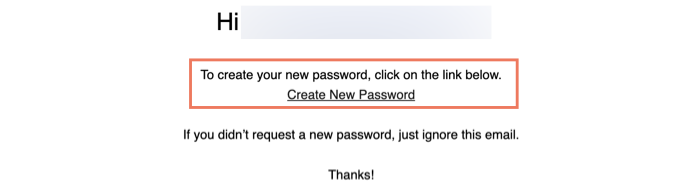
A screenshot showing the email sent to customers after they complete guest checkout, encouraging them to sign up to your site

What's next?

Need A Professional Website?
Contact Us 
Today!

Wix Invoices: Creating an Invoice

Wix Invoices: About Wix Invoices

Wix Price Quotes: Converting Price Quotes into Invoices

Wix Price Quotes: Managing Your Price Quotes

Wix Price Quotes: Creating a Price Quote

Desktop POS Solutions: Selling to Clients Using POS Checkout

Desktop POS Solutions: Collecting Payment with the Dashboard Card Reader Solution

Desktop POS Solutions: An Overview

Desktop POS Solutions: An Overview

Wix Retail POS: Managing Your Store's Staff

Wix Retail POS: Managing Shift Management for Team Members

Wix Retail POS: Managing Your Customer List

Wix Retail POS: Viewing Your Sales Report

Wix Retail POS: Managing Your Sales History

Wix Retail POS: Creating Invoices

Wix Retail POS: Accepting Exchanges from Customers

Wix Retail POS: Issuing Refunds

Wix Retail POS: Managing Business Locations

Wix Retail POS: Services Displayed on the Retail POS Tablet

Wix Retail POS: Accepting Payment for a Booked Session

Wix Retail POS: Booking Services and Accepting Payment

Wix Retail POS: About Purchase Orders

Wix Retail POS: Offering Shipping or Delivery

Wix Retail POS: Managing Out-of-Stock Inventory

Wix Retail POS: Setting Product Visibility for POS and Desktop

Wix Retail POS: Managing Your Store Catalog

Wix Retail POS: Creating Product Categories

Wix Retail POS: Adding New Products to the Catalog

Wix Retail POS: Selling Store Products at Your POS

Wix Retail POS: Customizing Printed Receipts

wix experts
Graphic2Traffic web design
©
bottom of page