top of page

Connecting a domain

Connecting a Domain You Own to Your Wix Site

Connect a domain you already own to your site. If you purchased the domain from another registrar, you can connect it to Wix and choose who hosts the domain records.

You can also connect a domain purchased from Wix, by transferring it from the relevant site / account.

Connect a domain purchased from another host

If you already own a domain from another domain registrar, you can either transfer or connect it to Wix:

  • Transferring a domain: This makes Wix your new domain host. You can manage your domain's contact information, DNS settings, and registration payments directly from your Wix account.

  • Connecting a domain: Your domain host remains outside of Wix. You can connect a domain to your Wix account in two ways - via 'name servers' or 'pointing'.

Tip:

Read about transferring vs. connecting a domain to your Wix account to learn which option best suits your needs.

Move a domain from one Wix site to another

If you already own a domain that you purchased from Wix, you can easily transfer it from one site to another. Learn more about moving a domain from one Wix site to another within the same account.

A screenshot showing the Assign to a different site option for a Wix domain.

Move a domain from one Wix account to another

You can also move a domain you own from one Wix account to another. Learn more about transferring your Wix domain to a different Wix account.
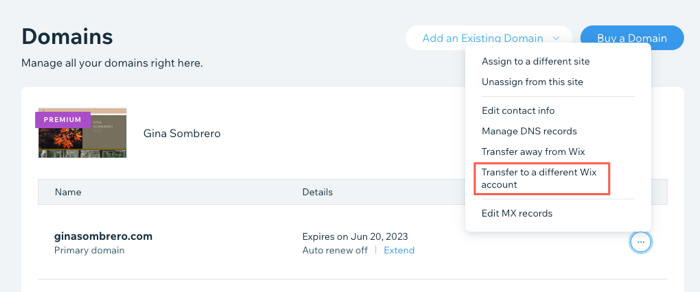
A screenshot showing the Transfer to a different Wix account option for a Wix domain.

Need A Professional Website?
Contact Us 
Today!

Wix Invoices: Creating an Invoice

Wix Invoices: About Wix Invoices

Wix Price Quotes: Converting Price Quotes into Invoices

Wix Price Quotes: Managing Your Price Quotes

Wix Price Quotes: Creating a Price Quote

Desktop POS Solutions: Selling to Clients Using POS Checkout

Desktop POS Solutions: Collecting Payment with the Dashboard Card Reader Solution

Desktop POS Solutions: An Overview

Desktop POS Solutions: An Overview

Wix Retail POS: Managing Your Store's Staff

Wix Retail POS: Managing Shift Management for Team Members

Wix Retail POS: Managing Your Customer List

Wix Retail POS: Viewing Your Sales Report

Wix Retail POS: Managing Your Sales History

Wix Retail POS: Creating Invoices

Wix Retail POS: Accepting Exchanges from Customers

Wix Retail POS: Issuing Refunds

Wix Retail POS: Managing Business Locations

Wix Retail POS: Services Displayed on the Retail POS Tablet

Wix Retail POS: Accepting Payment for a Booked Session

Wix Retail POS: Booking Services and Accepting Payment

Wix Retail POS: About Purchase Orders

Wix Retail POS: Offering Shipping or Delivery

Wix Retail POS: Managing Out-of-Stock Inventory

Wix Retail POS: Setting Product Visibility for POS and Desktop

Wix Retail POS: Managing Your Store Catalog

Wix Retail POS: Creating Product Categories

Wix Retail POS: Adding New Products to the Catalog

Wix Retail POS: Selling Store Products at Your POS

Wix Retail POS: Customizing Printed Receipts

wix experts
Graphic2Traffic web design
©
bottom of page