top of page

Setting up Wix Hotels

Adding Your Hotels Policies

Important:

This article refers to the original Wix Hotels. If you are using the new Wix Hotels by HotelRunner, which is not yet available to all users, please read the information here. Learn how to check which version of Wix Hotels you are using.

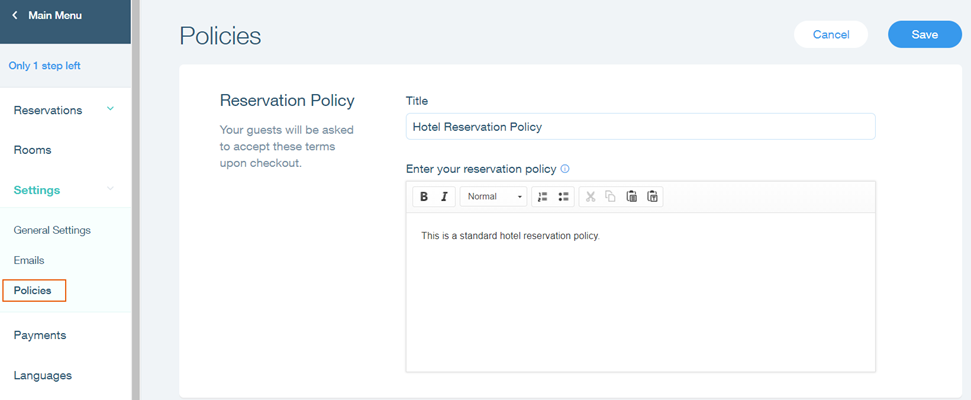
Add clear and concise hotel policies so your guests can book with confidence. With Wix Hotels, you can add 2 policies:

  • A reservation policy: This is your hotel's general reservation policy. It usually includes information about payment terms, check-in and check-out times, and anything else you want guests to know.

  • A cancellation policy: This policy should include anything you want guests to know about cancellation; how long in advance they need to cancel to receive a full refund, how much they need to pay if they cancel last minute etc.

To add your hotel policies:

  1. Go to your site's dashboard.

  2. Click the Hotels tab on the left.

  3. Click the Settings tab.

  4. Click Policies.

  5. Add your reservation and cancellation policies.
    Tip: Use the text editing toolbar to change the font, formatting and alignment of your policy text.

  6. Click Save.

Tip:

Follow the guidelines below when creating your policies:

  • Keep the policy clear and concise.

  • Use simple language and avoid jargon.

  • Do not use abbreviations.

Need A Professional Website?
Contact Us 
Today!

Wix Invoices: Creating an Invoice

Wix Invoices: About Wix Invoices

Wix Price Quotes: Converting Price Quotes into Invoices

Wix Price Quotes: Managing Your Price Quotes

Wix Price Quotes: Creating a Price Quote

Desktop POS Solutions: Selling to Clients Using POS Checkout

Desktop POS Solutions: Collecting Payment with the Dashboard Card Reader Solution

Desktop POS Solutions: An Overview

Desktop POS Solutions: An Overview

Wix Retail POS: Managing Your Store's Staff

Wix Retail POS: Managing Shift Management for Team Members

Wix Retail POS: Managing Your Customer List

Wix Retail POS: Viewing Your Sales Report

Wix Retail POS: Managing Your Sales History

Wix Retail POS: Creating Invoices

Wix Retail POS: Accepting Exchanges from Customers

Wix Retail POS: Issuing Refunds

Wix Retail POS: Managing Business Locations

Wix Retail POS: Services Displayed on the Retail POS Tablet

Wix Retail POS: Accepting Payment for a Booked Session

Wix Retail POS: Booking Services and Accepting Payment

Wix Retail POS: About Purchase Orders

Wix Retail POS: Offering Shipping or Delivery

Wix Retail POS: Managing Out-of-Stock Inventory

Wix Retail POS: Setting Product Visibility for POS and Desktop

Wix Retail POS: Managing Your Store Catalog

Wix Retail POS: Creating Product Categories

Wix Retail POS: Adding New Products to the Catalog

Wix Retail POS: Selling Store Products at Your POS

Wix Retail POS: Customizing Printed Receipts

wix experts
Graphic2Traffic web design
©
bottom of page