top of page

Additional Wix Apps

Adding and Setting Up the Open for Business App

Important:

The Open for Business app is no longer available in the Wix App Market. The app will be removed from your site on December 11th 2024 and Wix will no longer support it. As an alternative solution, you can add the Business Open Hours Widget by Purple, to your site.

Use the Open for Business app to ensure your customers are always informed about your business hours and any updates, including unexpected changes or scheduled closures.
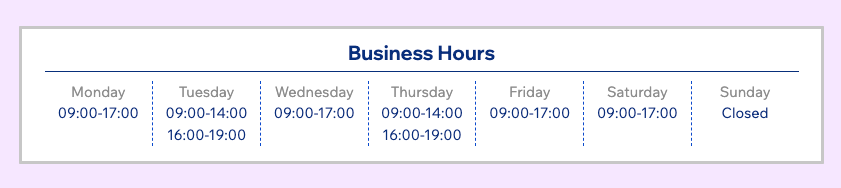
Set up the Open for Business app

Personalize the app's appearance to suit your brand's style by adjusting colors, fonts, layout, and the displayed information to blend with your site's look and feel.

To set up the Open for Business app:

  1. Select the Open for Business app in your editor.

  2. Click Settings.

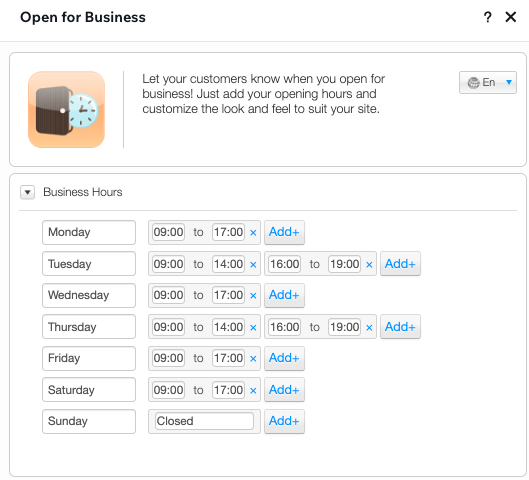
  3. In the Business Hours tab, edit the days and hours to suit your needs.

Note:

There's no need to delete any of the days, even if you're closed that day. In the Settings tab (step 4), you'll be able to select whether you want to display the "Closed" days at all.
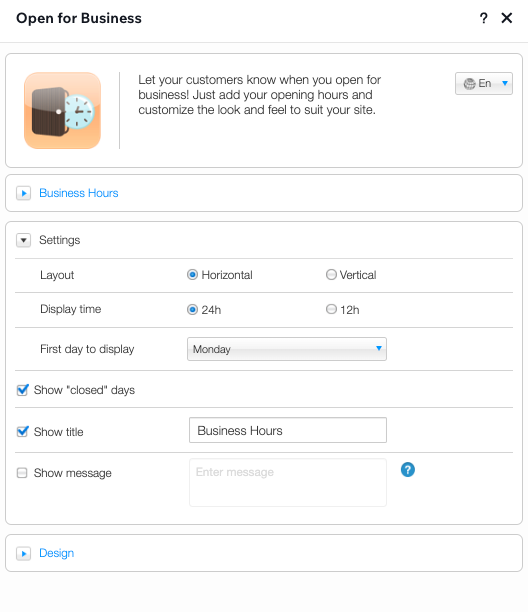
  1. Click to expand the Settings tab and customize the layout and display settings of the app.
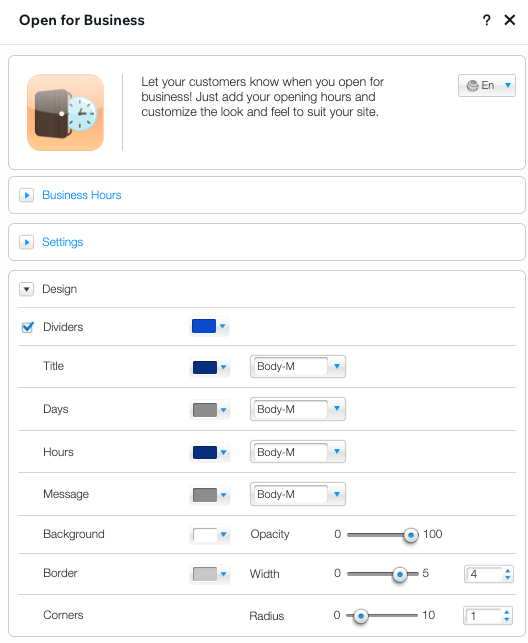
  1. Click to expand the Design tab and customize the colors, fonts, background and borders used in the app.
Tip:

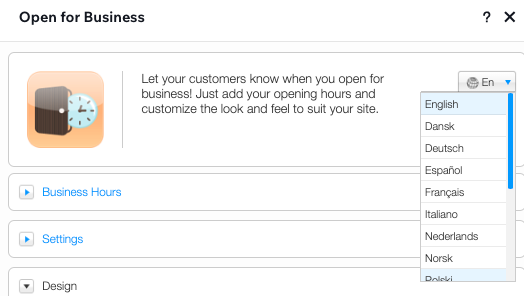
You can change the language of the app from the top of the Settings panel.
Need A Professional Website?
Contact Us 
Today!

Wix Retail POS: Using the Stripe Reader M2 Card Reader

Wix Retail POS: Using the BBPOS WisePad 3 Card Reader

Wix Retail POS: Selecting a Card Reader

Wix Retail POS: About Your HP Tablet

Wix Retail POS: Connecting Your POS Hardware

Wix Retail POS: About Wix POS for Your Brick and Mortar Business

Wix Mobile POS: Setting Up a Point of Sale with SumUp

Wix Mobile POS: Setting Up a Point of Sale with Square

Wix Restaurants POS: Selling Restaurant Items at a Mobile Point of Sale

Wix Pricing Plans POS: Selling Plans at a Mobile Point of Sale

Wix Events POS: Selling Event Tickets at a Mobile Point of Sale

Wix Bookings POS: Booking Services and Accepting Payments with the Wix App

Wix Bookings POS: Accepting Payment for Booked Services at a Mobile Point of Sale

Wix Stores POS: Managing Inventory for Mobile POS Sales

Wix Stores POS: Setting up Tax Rules for a Mobile Point of Sale

Wix Stores POS: Selling Products at a Mobile Point of Sale

Wix Mobile POS: Customizing Receipts

Wix Mobile POS: Selling Physical Gift Cards at a Mobile POS

Wix Mobile POS: Redeeming Virtual Gift Cards at a Mobile POS

Wix Mobile POS: Setting Up Receipt Printing

Wix Mobile POS: Collecting Tips

Wix Mobile POS: Understanding Invoices for Mobile POS Transactions

Wix Mobile POS: Setting Up Tap to Pay

Wix Mobile POS: Letting Staff Members Accept Payments

Wix Mobile POS: Charging Clients at a Point of Sale

Wix Mobile POS: Setting Up a Point of Sale

Wix Mobile POS: An Overview

Collecting the Colorado Retail Delivery Fee

Accessing the Avalara Dashboard

Including Tax in the Product Price

wix experts
Graphic2Traffic web design
©
bottom of page