top of page

Managing products and categories

Wix Stores: Displaying the Product Price per Unit

Display a price breakdown to make it easy for customers to compare prices.

Tip:

Displaying a price per unit is required in some regions, such as Germany.
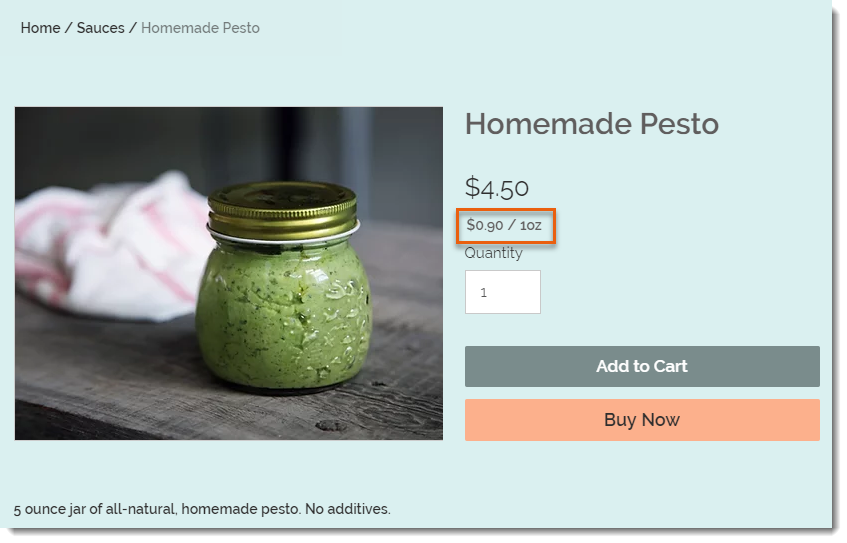
Screenshot of a product in a Wix store that has a price per unit display

To set up the price per unit display as in the image above, you need to select your type of unit (in this example, it's ounces), then enter the total weight of the product (it's a 5-ounce jar). Finally, you need to enter the unit you are using for your calculations (i.e. 1 ounce is the base unit in this example).
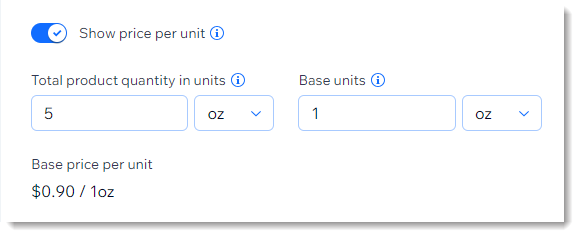
Screenshot of part of the product creation page showing the price per unit setup

After entering these parameters, the price per ounce (for example) is calculated automatically and appears on your live site under the product price.

After setup:

The price per unit calculation updates automatically whenever you:

  • Change the product price

  • Add a sale price

  • Add product variants with higher or lower prices

To add a price per unit display:

  1. Go to Products in your site's dashboard.

  2. Create a new physical product or edit an existing one.

  3. In the Pricing section, enable the Show price per unit toggle.

  4. Under Total product quantity in units, select the relevant type of unit (e.g. ounces) from the drop-down.
    Tip: You can switch between metric and imperial units in your regional settings.

  5. Under Total product quantity in units, enter the total product quantity in units (e.g. if you are selling a 5-ounce jar, enter "5").

  6. Enter the unit you want to measure by (e.g. enter 1 ounce to display a price per ounce).

  7. Click Save.

Need A Professional Website?
Contact Us 
Today!

Wix Apps: Adding the Wix FAQ App Across Multiple Pages

Wix FAQ App: Sharing Links to Your Questions

Working with Categories in the Wix FAQ App

Managing Your Questions in the Wix FAQ App

Adding Media to an Answer in the Wix FAQ App

Adding a New Question in the Wix FAQ App

Adding and Setting Up the Wix FAQ App

The Wix FAQ App: An Overview

Publishing a Google Sheets Spreadsheet from the Table Master App

Manually Adding Additional Columns or Rows to Your Table Master App

Adding and Setting Up the Table Master App

Wix Donations: Archiving a Campaign

Wix Donations: Managing Donations

Wix Donations: Adding and Setting Up Wix Donations

Wix Donations: An Overview

Troubleshooting Instagram Feed App Issues

Connecting Your Instagram Feed to Your Instagram Personal Account

Connecting Your Instagram Feed to Your Instagram Business Account

Setting Up the Old Instagram Feed App

Wix Apps: Adding and Setting Up the Instagram Feed App

Switching from the Old Instagram Feed App to the New Instagram Feed App

About the Instagram Feed App by Wix

Embedding Google AdSense Code with the HTML Element

Troubleshooting: Not Seeing My Google AdSense Ads

Google AdSense Request Rejected by Google

Apps Made by Wix: Adding and Setting Up the Wix Monetize with AdSense App

About the Wix Monetize with AdSense App

Unable To Find and Delete Cookie Alert App In Your Editor

Using the Member's Area with the Shared Gallery App

Deleting the Shared Gallery App

wix experts
Graphic2Traffic web design
©
bottom of page