top of page

Designing your store

Wix Stores: Customizing the Quick View in the Product Gallery

Quick view allows customers to view product details in a popup, without leaving your shop page. You can customize the quick view colors and fonts, as well as the "Quick View" and "Add to Cart" buttons.

Screenshot of a sample Grid Gallery in a Wix store

In this article, learn more about:

Enable or disable Quick View

You can add Quick View to any product gallery or to the Category page.

Important:

If the Add to Cart button is enabled and placed on top of the product image, the Quick View button won't be displayed. To customize the Add to Cart button placement, go to the Layout tab.

To enable or disable Quick View:

  1. Click the relevant Product Gallery or the Category Page in your editor.

  2. Click the Settings icon .

  3. Click the Display tab.

  4. Click the checkbox next to Quick View button to enable or disable it.

Customize the Quick View button

When Quick View is enabled and a customer on desktop hovers with their mouse over a product, the Quick View button appears. You can customize the button's colors, opacity, and font.
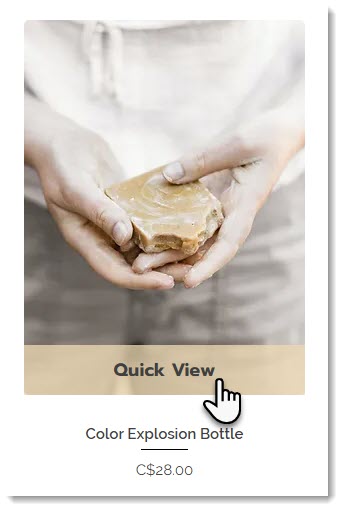
Screenshot of a product in a Wix store with the Quick View enabled

To customize the Quick View button:

  1. Click the relevant Product Gallery or the Category Page in your editor.

  2. Click the Settings icon .

  3. Click the Design tab.

  4. Select Quick View button.

  5. Customize the button using the available options.

Customizing the Quick View window

After a customer clicks the Quick View button, the Quick View window opens. You can customize the design of this window, so it matches your store's look and feel.

To customize the quick view:

  1. Click the relevant Product Gallery or the Category Page in your editor.

  2. Click the Settings icon .

  3. Click the Quick View tab.

  4. Customize the Quick View using the available options.

Need A Professional Website?
Contact Us 
Today!

Wix Apps: Adding the Wix FAQ App Across Multiple Pages

Wix FAQ App: Sharing Links to Your Questions

Working with Categories in the Wix FAQ App

Managing Your Questions in the Wix FAQ App

Adding Media to an Answer in the Wix FAQ App

Adding a New Question in the Wix FAQ App

Adding and Setting Up the Wix FAQ App

The Wix FAQ App: An Overview

Publishing a Google Sheets Spreadsheet from the Table Master App

Manually Adding Additional Columns or Rows to Your Table Master App

Adding and Setting Up the Table Master App

Wix Donations: Archiving a Campaign

Wix Donations: Managing Donations

Wix Donations: Adding and Setting Up Wix Donations

Wix Donations: An Overview

Troubleshooting Instagram Feed App Issues

Connecting Your Instagram Feed to Your Instagram Personal Account

Connecting Your Instagram Feed to Your Instagram Business Account

Setting Up the Old Instagram Feed App

Wix Apps: Adding and Setting Up the Instagram Feed App

Switching from the Old Instagram Feed App to the New Instagram Feed App

About the Instagram Feed App by Wix

Embedding Google AdSense Code with the HTML Element

Troubleshooting: Not Seeing My Google AdSense Ads

Google AdSense Request Rejected by Google

Apps Made by Wix: Adding and Setting Up the Wix Monetize with AdSense App

About the Wix Monetize with AdSense App

Unable To Find and Delete Cookie Alert App In Your Editor

Using the Member's Area with the Shared Gallery App

Deleting the Shared Gallery App

wix experts
Graphic2Traffic web design
©
bottom of page