top of page

Managing products and categories

Wix Stores: Allowing Customers to Add a Message When Purchasing a Product

Add a custom text box to your Product Page so that your customers can leave you a message when they purchase a specific product. This could be used to add personalization options to products, or for adding gift wrap options.

Screenshot of a product displayed on the product page in a Wix stores with a customer message field outlined

To add a custom text field to your Product Page:

  1. Go to Products in your site's dashboard.

  2. Select the relevant product or click New Product to add a new one.

  3. Scroll down and click Add Custom Text Field.

  4. Enter the title of the text field (e.g. What name should we engrave?).

  5. Enter the character limit for the text field.

  6. Select or deselect the Mandatory field checkbox:Selected: The customer must fill in the text field.
    Deselected: The customer can leave it blank.

  7. (Optional) Click Add Another to add a second custom text field.
    Tip: You can add up to 2 fields.

  8. Click Save.

After a customer makes an order, you can see the information they wrote in the Orders tab.
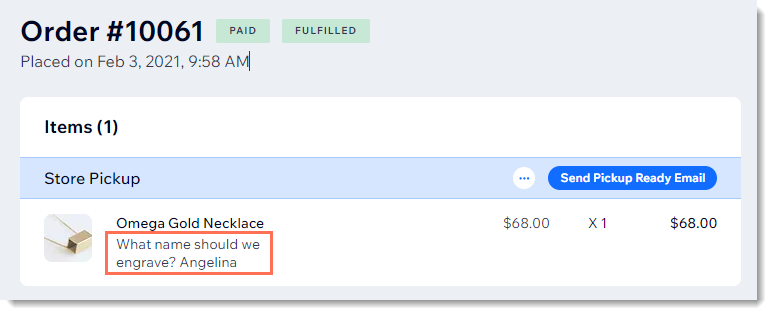
Screenshot of a store order in the Wix dashboard with a customer's message outlined

Need A Professional Website?
Contact Us 
Today!

Wix Apps: Adding the Wix FAQ App Across Multiple Pages

Wix FAQ App: Sharing Links to Your Questions

Working with Categories in the Wix FAQ App

Managing Your Questions in the Wix FAQ App

Adding Media to an Answer in the Wix FAQ App

Adding a New Question in the Wix FAQ App

Adding and Setting Up the Wix FAQ App

The Wix FAQ App: An Overview

Publishing a Google Sheets Spreadsheet from the Table Master App

Manually Adding Additional Columns or Rows to Your Table Master App

Adding and Setting Up the Table Master App

Wix Donations: Archiving a Campaign

Wix Donations: Managing Donations

Wix Donations: Adding and Setting Up Wix Donations

Wix Donations: An Overview

Troubleshooting Instagram Feed App Issues

Connecting Your Instagram Feed to Your Instagram Personal Account

Connecting Your Instagram Feed to Your Instagram Business Account

Setting Up the Old Instagram Feed App

Wix Apps: Adding and Setting Up the Instagram Feed App

Switching from the Old Instagram Feed App to the New Instagram Feed App

About the Instagram Feed App by Wix

Embedding Google AdSense Code with the HTML Element

Troubleshooting: Not Seeing My Google AdSense Ads

Google AdSense Request Rejected by Google

Apps Made by Wix: Adding and Setting Up the Wix Monetize with AdSense App

About the Wix Monetize with AdSense App

Unable To Find and Delete Cookie Alert App In Your Editor

Using the Member's Area with the Shared Gallery App

Deleting the Shared Gallery App

wix experts
Graphic2Traffic web design
©
bottom of page