3rd-Party POS Solutions
Wix Mobile POS: Setting Up a Point of Sale with SumUp
Important:
This article is about mobile POS with SumUp as your payment provider.
For information on Wix's own Wix Mobile POS, click here.
For info on the Wix Retail POS tablet solution for brick & mortar stores, click here.
Connect to the SumUp payment provider to turn your phone into a point of sale (POS). After setup, you can collect cash or credit card payments wherever you go.
POS with SumUp is available in Austria, Belgium, Bulgaria, Cyprus, France, Germany, Ireland, Italy, Latvia, Luxembourg, Malta, Netherlands, Norway, Poland, Slovakia, Slovenia, Spain, Switzerland, and the UK.
Tell me about other POS solutions
You can accept payment through the following methods:
Wix Mobile POS: Wix offers an integrated POS solution. Learn more
Square: Sell at a point of sale with the Square payment provider. Square is available in the US, Canada, UK, Australia, and Japan. Learn more
Cash: You can accept cash payment at a POS after downloading the Wix mobile app. No further setup is needed.
Step 1 | Download the Wix app
Go to the Apple App Store (on iPhone) or Google Play (on Android).
Type 'Wix' in the Search field.
Click Get or Install to download the app.
Tip:
If you are accessing this article on your phone, you can click to download:
You are now ready to accept cash payments on your mobile device. Learn how
Step 2 | Set up SumUp as your payment provider
Go to Accept Payments in your site's dashboard and connect SumUp as your payment provider.
Note:
You can set up SumUp without an upgrade, but to start collecting payments, you'll need a Premium plan or Studio plan that supports payments.
Step 3 | Order a SumUp card reader
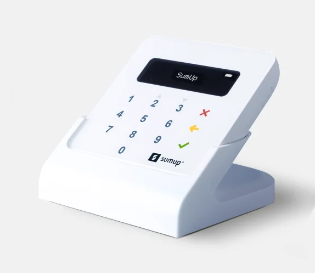
To accept credit card payments, you need one of SumUp's credit card readers.
SumUp card readers connect to your smartphone or tablet via Bluetooth. They can be used to swipe, tap or insert debit/credit cards.