top of page

Setting rates & payments

Setting a Weekly or Monthly Rate in Wix Hotels

Important:

This article refers to the original Wix Hotels. If you are using the new Wix Hotels by HotelRunner, which is not yet available to all users, please read the information here. Learn how to check which version of Wix Hotels you are using.

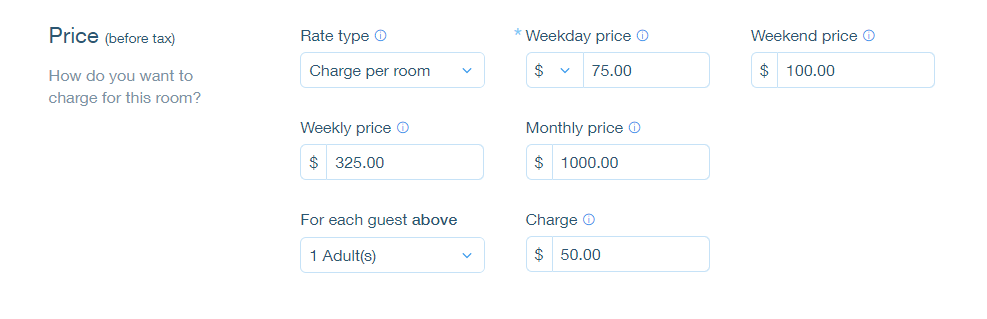
The weekly rate is the rate a guest pays when booking for 7 nights. The monthly rate is the rate a guest pays when booking for 28 nights. Wix Hotels allows you to set the rate at which you want to charge your an individual unit.

To set weekly or monthly rates:

  1. Go to your dashboard.

  2. Click the Hotels tab.

  3. Click the Rooms tab.

  4. Click the Edit icon for an existing room or click Create New to add a new one.

  5. Scroll down to the Price section.

  6. Click More Pricing Options.

  7. Enter the weekly and/or monthly price.

  8. Click Save.

Tip:

  • If a guest books for 8 nights, the rate is calculated as the weekly rate + the daily or weekend rate.

  • If a guest books for 29 nights, the rate is calculated as the monthly rate + the daily or weekend rate.

Need A Professional Website?
Contact Us 
Today!

Wix Apps: Adding the Wix FAQ App Across Multiple Pages

Wix FAQ App: Sharing Links to Your Questions

Working with Categories in the Wix FAQ App

Managing Your Questions in the Wix FAQ App

Adding Media to an Answer in the Wix FAQ App

Adding a New Question in the Wix FAQ App

Adding and Setting Up the Wix FAQ App

The Wix FAQ App: An Overview

Publishing a Google Sheets Spreadsheet from the Table Master App

Manually Adding Additional Columns or Rows to Your Table Master App

Adding and Setting Up the Table Master App

Wix Donations: Archiving a Campaign

Wix Donations: Managing Donations

Wix Donations: Adding and Setting Up Wix Donations

Wix Donations: An Overview

Troubleshooting Instagram Feed App Issues

Connecting Your Instagram Feed to Your Instagram Personal Account

Connecting Your Instagram Feed to Your Instagram Business Account

Setting Up the Old Instagram Feed App

Wix Apps: Adding and Setting Up the Instagram Feed App

Switching from the Old Instagram Feed App to the New Instagram Feed App

About the Instagram Feed App by Wix

Embedding Google AdSense Code with the HTML Element

Troubleshooting: Not Seeing My Google AdSense Ads

Google AdSense Request Rejected by Google

Apps Made by Wix: Adding and Setting Up the Wix Monetize with AdSense App

About the Wix Monetize with AdSense App

Unable To Find and Delete Cookie Alert App In Your Editor

Using the Member's Area with the Shared Gallery App

Deleting the Shared Gallery App

wix experts
Graphic2Traffic web design
©
bottom of page