top of page

Creating your plans

Pricing Plans: About Recurring Plans

Important:

The article below discusses the Wix subscriptions app Pricing Plans. If you're looking for information about upgrading your site, visit our articles for choosing a Wix Premium or Wix Studio site plan.

Offer your clients subscriptions that automatically renew weekly, monthly, or yearly.

Be sure to also set the overall length of a plan. For example, you can create a plan that renews every month for a year. At the end of the year, the plan expires. You can also create a plan that continues to renew until cancelled.
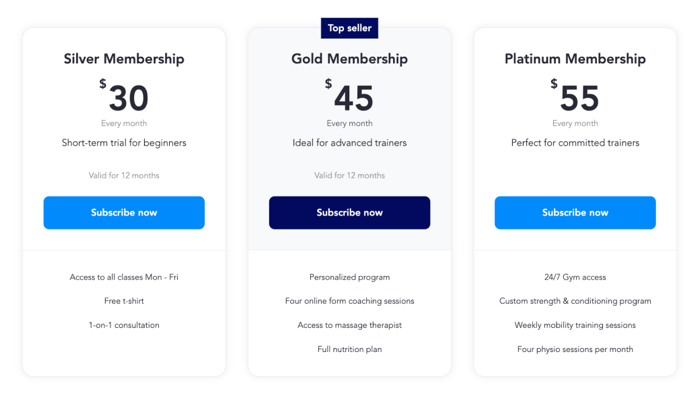
Screenshot showing various recurring plans and their benefits on a live site.

Tip:

Both membership plans and packages can be recurring plans.

Creating recurring plans

When you are creating a plan, select Recurring Payment as your payment type. You can then set the price, payment frequency and length of plan. You can also give a free trial to encourage new clients to sign up.
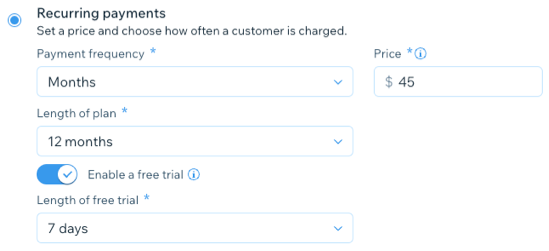
A screenshot showing how to create a recurring pricing plan in the dashboard.

Note:

Click here for more information on which payment providers support recurring payments on Wix.

Canceling plans with recurring payments

When you cancel a plan with a recurring payment, you choose when the cancellation takes effect. For example, for plans that renew monthly, you may want to let clients keep access to services and content until the end of the current month.

On the other hand, with a plan that occurs yearly, you may want access to end as soon as you cancel the plan.
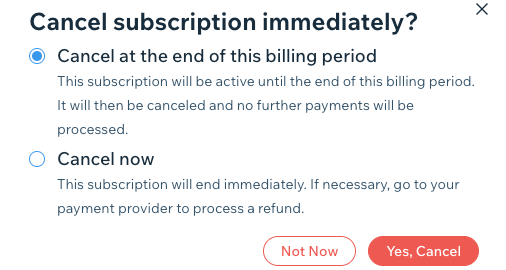
A screenshot showing how to cancel a plan with recurring payments.

Changing payment methods

If you choose to switch payment providers, you must first cancel all active recurring plans, switch providers, and then ask your clients to repurchase the same plan.

A screenshot showing how to turn off credit/debit cards before switching payment providers.

Dealing with failed payments

When a client's credit card is cancelled or expires, or when there are insufficient funds to cover the subscription, you do not receive payment. This automatically cancels your client's plan.

If the client wants to continue their subscription with a new credit card, they need to purchase a new plan.
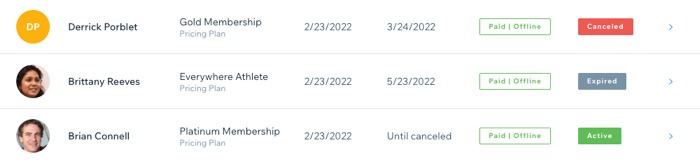
A screenshot showing different plan statuses, including canceled, expired and active plans.

Need A Professional Website?
Contact Us 
Today!

Wix Apps: Adding the Wix FAQ App Across Multiple Pages

Wix FAQ App: Sharing Links to Your Questions

Working with Categories in the Wix FAQ App

Managing Your Questions in the Wix FAQ App

Adding Media to an Answer in the Wix FAQ App

Adding a New Question in the Wix FAQ App

Adding and Setting Up the Wix FAQ App

The Wix FAQ App: An Overview

Publishing a Google Sheets Spreadsheet from the Table Master App

Manually Adding Additional Columns or Rows to Your Table Master App

Adding and Setting Up the Table Master App

Wix Donations: Archiving a Campaign

Wix Donations: Managing Donations

Wix Donations: Adding and Setting Up Wix Donations

Wix Donations: An Overview

Troubleshooting Instagram Feed App Issues

Connecting Your Instagram Feed to Your Instagram Personal Account

Connecting Your Instagram Feed to Your Instagram Business Account

Setting Up the Old Instagram Feed App

Wix Apps: Adding and Setting Up the Instagram Feed App

Switching from the Old Instagram Feed App to the New Instagram Feed App

About the Instagram Feed App by Wix

Embedding Google AdSense Code with the HTML Element

Troubleshooting: Not Seeing My Google AdSense Ads

Google AdSense Request Rejected by Google

Apps Made by Wix: Adding and Setting Up the Wix Monetize with AdSense App

About the Wix Monetize with AdSense App

Unable To Find and Delete Cookie Alert App In Your Editor

Using the Member's Area with the Shared Gallery App

Deleting the Shared Gallery App

wix experts
Graphic2Traffic web design
©
bottom of page