top of page

Adding videos & channels

Wix Video: Scheduling A Publish Time for Videos

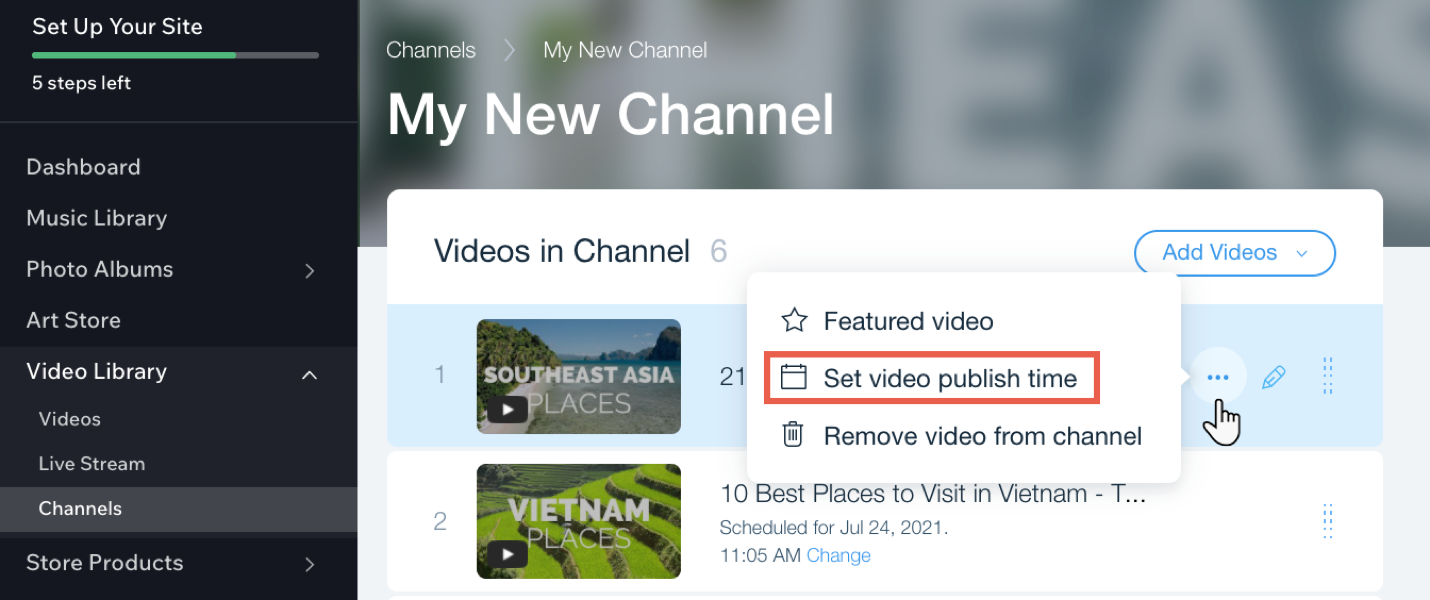
You can set times for your videos to appear on your site whenever you need. This is a great way to ensure that videos are automatically and regularly published to your site, without having to manually publish them.
Notes:

  • You need to add the video first before you can schedule it.

  • Once you've scheduled the video, it won't appear on your site until the specified publish date and time.

To schedule a publish time for videos in your channel:

  1. Go to Video Library in your site's dashboard.

  2. Click the Channels tab.

  3. Click the relevant channel.

  4. Hover over the relevant video and click the Show more icon .

  5. Click Set video publish time.

  6. Select a date and time.

  7. Click Save.

Tip:

You can change the time of a video by clicking Change next to the current scheduled time.

Need A Professional Website?
Contact Us 
Today!

Wix Bookings: The Essential Checklist for Professional Bookings Site Owners

Wix Bookings: About Wix Bookings

Resolving Email Issues

Changing the Priority of Your MX Records

Connecting Email Purchased Outside of Wix

Google Workspace: Adding a DKIM Record to your Business Email

Google Workspace: Adding an SPF Record to your Business Email

Adding a DKIM (TXT) Record

Adding or Updating SPF Records in Your Wix Account

Business Email: General Troubleshooting

Connecting Email Accounts from Different Email Providers for the Same Domain

Increasing Email Deliverability of Emails Sent from Your Business Email

Top Reasons for Using a Personalized Business Email

Business Email: An Overview

Activating DNSSEC for a Wix Domain

Transferring Your Wix Domain Away from Wix

ICANN: Confirming Your Domain Contact Information

Connecting a Subdomain to Your Wix Site

Connecting a Wix Domain to an External Site

Transferring Your Wix Domain to a Different Wix Account

Activating Private Registration for a Wix Domain

Checking if a Domain Name is Available

List of Available Domain Extensions

Connecting a Domain Purchased from Wix

Purchasing a Domain vs. Purchasing a Site Plan

Purchasing a Domain from Wix

Connecting a Domain You Own to Your Wix Site

Accessing Your Domains Page

Finding Your Domain Registrar Details

Exporting or Embedding Your Wix Site Elsewhere

wix experts
Graphic2Traffic web design
©
bottom of page