


Live streaming your videos
Wix Video: About Live Streaming
Stream live videos directly on your site and connect with your fans in real time. Share anything: bring your class online, broadcast a concert, lead a Q&A session and more.
How long can I stream for?
When using Wix Video for free, you can broadcast up to 10 minutes in a single stream.
If you have upgraded to a Wix Premium Plan, you can broadcast up to 3 hours in a single stream.
Scheduling an Event in Advance
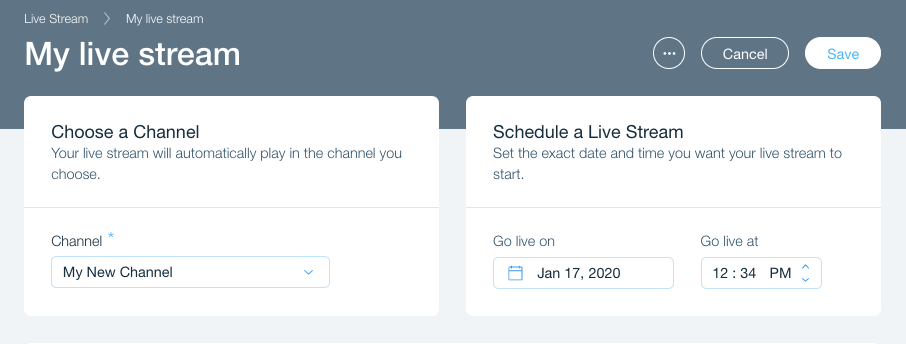
Plan your stream for when you need it. You can schedule a live stream event in advance to ensure that you don't miss out on a thing. Learn More
Live Stream from Your Desktop Using an Encoder
You can go live directly from your desktop using an encoder. An encoder is a special software that allows you to stream from your desktop computer. Learn More

Additional Info
Requirements for live streaming
Add Wix Video to your published site, create a channel in Wix Video and display that channel on your site (Otherwise, your live stream won't appear).
Make sure you have an encoder before going live. An encoder is the platform that connects your computer's camera to the Wix Video player. To learn more, click here.
FAQs
Refreshing your site:
If you go live without scheduling in advance, your site visitors must refresh the page in order to watch your live stream.
For a scheduled event, your site refreshes automatically.
Can I charge viewers to watch my stream?
Yes! You can monetize an entire channel and live stream via that channel. To learn how to set up a channel subscription, click here.
What happens when I end my stream?
Every live video is automatically saved to your Video Library and counts towards your media storage. A video that exceeds your storage limit is saved but unavailable until you delete older content or upgrade. To learn how to manage your video storage, click here.