


Using the Studio Editor Tools
Wix Studio App: An Overview
We've launched a brand new mobile app for Wix Studio, designed to keep you organized and in control while you're on the move. This new app gives you all the capabilities of the Wix app—and more.
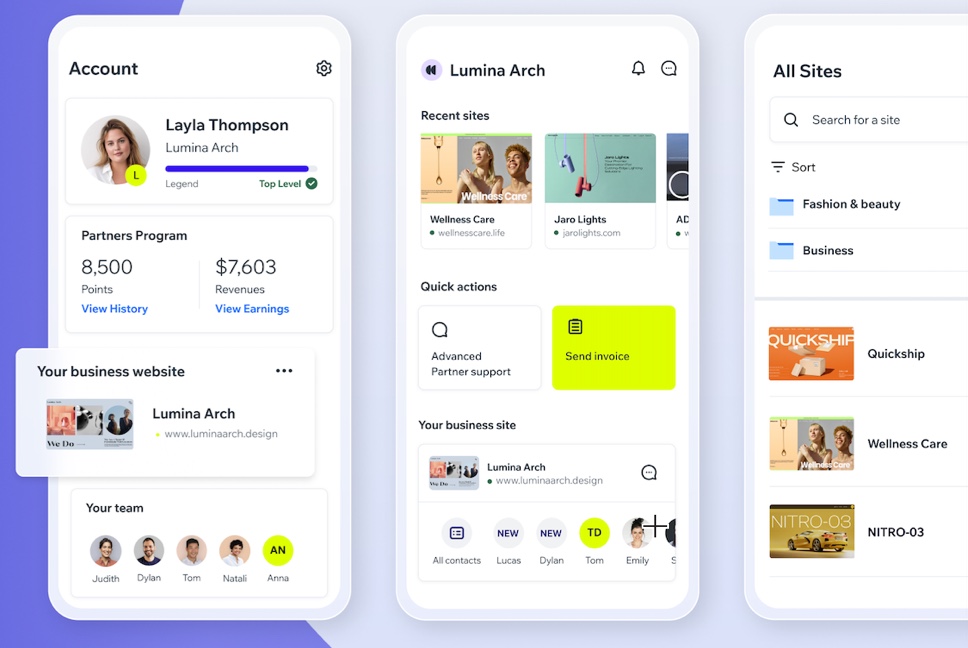
From the Wix Studio app you can manage all aspects of your agency including your agency's site, projects, and clients. Handle business on-the-go by responding to Wix Marketplace Leads, messaging your contacts, and getting paid. You can also easily view and manage each of your clients' sites, as well as switch between workspaces so you can stay on top of every project.
If you need assistance at any time, reach out to Customer Care directly from the app. You can also track and get status updates for any existing tickets you've created so you never have to start conversations over again.
Ready to get started?
Download the Wix Studio app and handle business on the go.
Access and manage all sites from one place
In the Wix Studio app, you can easily view all of the sites you've created as well as any you've worked on as a collaborator.
From Sites at the bottom of the app, view a list of every site and folder you have access to. From here you can quickly navigate to the management options of each site, as well as manage collaborators. Select a specific site on the list to get an at-a-glance overview of that site's traffic and business activity.
Switch between multiple workspaces
If you belong to multiple workspaces, easily switch between them in the Wix Studio app. For example, if you have your own agency and are also working for an agency, you might have one workspace for your business and also belong to the agency's workspace. A drop-down at the top of the app allows you to switch between workspaces so you can handle everything from one place.
Learn more about creating and setting up a workspace.
Invite collaborators to work on a site
Invite people to collaborate on a site from the Wix Studio app. When you invite them you can choose a specific role depending on their expertise. Only site owners and co-owners can invite people to collaborate on a site.
From Sites at the bottom of the app, select a site to get a breakdown of that site's current collaborators. From here you can choose to invite new collaborators, set existing permissions, and remove collaborators.
Note:
To manage your team, go to Wix Studio from a desktop.
Learn more about inviting people to collaborate from the Wix Studio app.
Add your business website to the app's Home screen
If you have a separate business site (e.g. a site where clients contact and book you as an agency) you can bookmark that site so it always appears in the Wix Studio app's Home screen.
This gives you quick access to your business including your contact list and Inbox so you never miss a message. You can add a different business site to each of the workspaces you own, or select the same one in each.