


Promoting stores sales
Wix Stores: Creating a Free Shipping Coupon
Encourage your customers to complete purchases by offering them a free shipping coupon. You can limit the coupon so that it can only be used for purchases above a set price.

In this article, learn more about:
Creating a free shipping coupon
After you give your coupon a name and set a price, you can choose exactly when and how it can be used.
To create a free shipping coupon:
Go to Coupons in your site's dashboard.
Click +New Coupon.
Select Free Shipping.
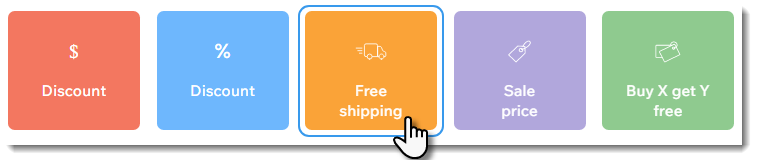
Enter the coupon code.
Note: This is the code customers enter.Enter the name of the coupon.
Note: Appears in the cart page and dashboard.Select an option from the Apply to drop-down:All orders: The coupon can be used for any purchase.
Minimum order subtotal: The coupon can be used when the order subtotal is over a specific amount. Enter the amount.
Select the Include subscriptions checkbox to apply this coupon to product subscriptions.
Note: Applies to every cycle (e.g. every month of a monthly subscription).Select when the coupon is valid:Enter the start date.
Enter the end date, or select the Don't set an end date checkbox.
(Optional) Select the checkboxes next to the limits you want to apply:Limit the total number of uses for this coupon: Enter the total number of times the coupon can be used.
Tip: Multiple purchases by the same customer are counted individually.
Limit to one use per customer: Each customer can use the coupon only once.
Click Create Coupon.
FAQs
Click a question below to learn more about coupons.
How are coupons applied to product subscriptions?
When you select the Include subscriptions checkbox, and a customer uses a coupon to purchase a subscription, the discount applies each cycle. This means that if a customer buys a monthly subscription that lasts 12 months, the customer gets a discount for each of the 12 purchases.
Why isn't the promo code visible on the cart page?
The promo code may not be visible because you hid it or because the text color blends in with the background color.
To unhide the promo code link:
Click Pages and Menu
 on the left side of the Editor.
Click Store Pages.
Click Cart Page.
Click Settings.
Click the Settings tab.
Make sure the Promo code link checkbox is selected.
To change the promo code text color:
Click Pages and Menu
on the left side of the Editor.Click Store Pages.
Click Cart Page.
Click Settings.
Click Design.
Scroll down to the Links text and select a color that contrasts with the Cart Page background.

Are coupon codes case sensitive?
No, coupon codes are not case sensitive. Customers can enter your codes without using the same case.
For purchases with the manual payment method, when does the number of available coupons update?
If you limited your coupon use to a set number of coupons (e.g. available for the first 100 shoppers), every time a coupon is used, it's counted. When a customer pays you offline, the coupon count is updated when you mark the order as paid.
How can I promote or share my coupon?
Use the Promote link to easily create an email marketing campaign or social post for any of your coupons.
To promote your coupon:
Go to Coupons in your site's dashboard.
Click the More Actions icon
 next to the relevant coupon.
Select Promote.
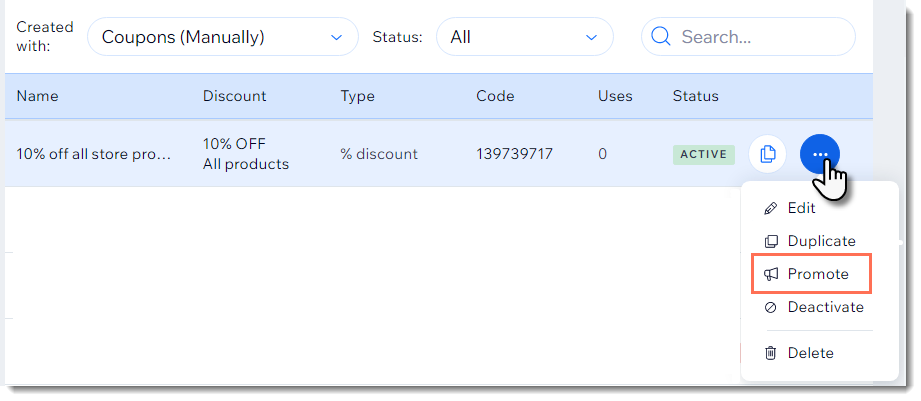
Select a promotion option:Send a social post. Learn more about social posts.
Send an email marketing campaign. Learn more about email marketing campaigns.
Can I create a coupon with unique coupon codes for each use?
Yes. You can use the Bulk Coupon Creator app to generate up to 1000 unique codes per coupon.
Can I offer discounts without coupon codes?
Yes, you can also offer products at a sale price or provide automatic discounts.