


Setting up your store
Wix Stores: Adding Wix Stores
Add Wix Stores to create a professional online shop and grow your eCommerce business. With Wix Stores, you'll have all the tools you need at your fingertips. You can display your products in stunning galleries, manage your inventory and orders in a professional dashboard, provide customers with secured checkout, and more.
Choose a template that already has Wix Stores installed, or pick any template you want and add Wix Stores to it following the step below..

Important:
To sell products, you need to upgrade your site to a Premium plan or Studio plan that allows you to accept payments.
Review the legal requirements for Wix features before adding Wix Stores.
Adding Wix Stores
You can add Wix Stores from inside your editor or from your site's dashboard.
Wix Editor
Wix Studio
Dashboard
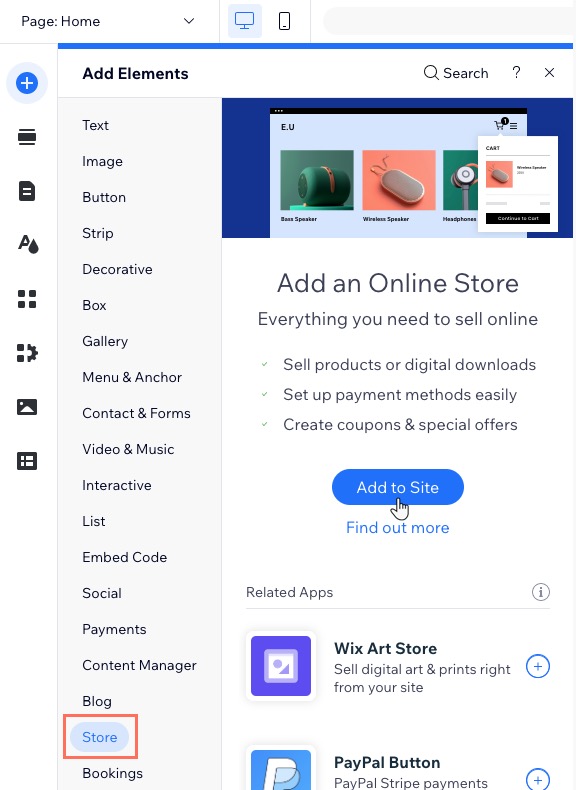
Click Add Elements
 on the left side of the editor.
Click Store.
Click + Add to Site.
About the pages in Wix Stores
After adding Wix Stores, you get several new pages on your site.
A new page called Shop is added which contains your product gallery. You also get additional hidden pages:
Product Page: The page which displays info about one product.
Category Page: The main store page (this new page is not yet available for all).
Cart Page: Where customers review products before checking out.
Checkout Page : Where customers complete purchases.
Thank You Page: The page customers view after a purchase.
Pages for your members are also automatically added so that customers can log in and view their order(s) status, store their addresses and manage credit cards for faster checkout (e.g. My Orders, My Addresses).