top of page

Taking online orders

Wix Restaurants: Allowing Customers to Place Orders for a Future Date

Important:

You can give customers the option of placing orders a few hours or days before the delivery time. For example, a bakery needs a few days notice in order to bake and decorate a birthday or a wedding cake. You can set a minimum time in advance (e.g. 3 days) that customers need to book in order to get their order delivered when they want it.

Tip:

Do you have a catering business? To learn how to transform your site into a catering site, click here.

To enable future ordering:

  1. Go to Order Settings in your site's dashboard.

  2. Click Order scheduling.

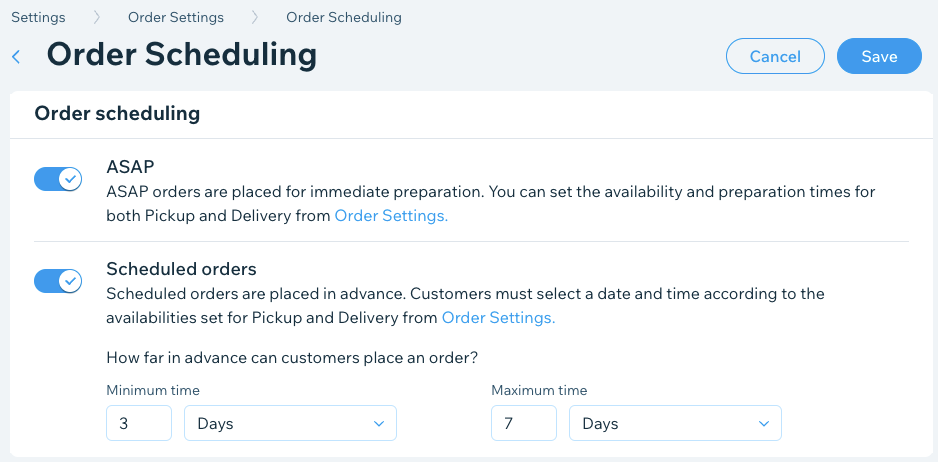
  3. Click the Scheduled orders toggle to enable and set how far in advance customers can place an order:Minimum time: Enter a number and select Minutes, Hours or Days from the drop-down list.
    Note: This is the minimum time customers can place a future order in advance.
    Maximum time: Enter a maximum number and select Minutes, Hours or Days from the drop-down list.
    Note: This is the maximum time customers can place a future order in advance.

  4. (Optional) Disable the ASAP toggle to accept future orders only.

  5. Click Save.

A screenshot of setting your schedule for online orders, whether ords can be placed immediately or in advance.

Note:

If you require customers to pick a delivery date and time, the Order Now button is inactive until your customer chooses a time.

Need A Professional Website?
Contact Us 
Today!

Wix Stores: Setting Up Affiliate Marketing with the Goaffpro App

Wix Contacts: About Your Contact Panel

Wix Contacts: Using Pinned Actions in Your Contact Panel

Wix Contacts: Creating a Test Contact

Wix Contacts: Changing a Contact's Subscription Status

Wix Contacts: Adding and Managing Custom Contact Fields

Wix Contacts: Creating and Using Contact Labels

Wix Contacts: Creating a Segment

Wix Contacts: About Segments

Wix Contacts: Exporting Your Contacts

Wix Contacts: Troubleshooting Contact Importing Issues

Wix Contacts: Importing Contacts by Uploading a CSV File

Wix Contacts: Importing Contacts from a Gmail Account

Wix Contacts: Managing Your Contact List

Wix Contacts: Manually Adding a Contact

Wix Contacts: An Overview

Wix Forms: Creating a Coupon

Wix Forms: Setting Up Tax on Your Form

Wix Forms: The Difference between the New and Old Wix Forms

Wix Forms: Viewing Form Submissions from Your Dynamic Pages

Wix Forms: Managing Your Forms from the Dashboard

Wix Forms: Choosing an Address Field

Wix Forms: Adding and Setting Up a Donation Form

Wix Forms: Adding Submission Limits to Your Forms

Wix Forms: Adding and Managing Rules

Wix Forms: Upgrading Wix Forms

Wix Forms: Adding and Setting Up a Multi-Step Form

Wix Forms: Adding Payments to a Site Form

Wix Forms: Enabling Double Opt-In for Subscribers

Wix Forms: Adding and Setting Up a Subscribe Form

wix experts
Graphic2Traffic web design
©
bottom of page