top of page

Taking online orders

Wix Restaurants: Accepting Orders in the Wix App

Important:

View incoming orders in real-time directly from the Wix app and accept them with just a swipe to the right. You'll get a notification as soon as a customer places an order on your restaurant site. You can tap an order to see its details and a price breakdown, and print or email the order. In cases where you're unable to fulfill an order, you can also reject it directly from the app.

To accept incoming restaurant orders in the Wix app:

  1. Go to your site in the Wix app.

  2. Tap Manage at the bottom right.

  3. Tap Restaurant Orders. The New tab displays the new orders waiting to be accepted or rejected.

  4. Tap on the order you want to accept.

  5. Review the order and then tap Accept Order at the bottom to accept it.

The newly accepted orders now appear in the In Progress tab. Once you've completed the order, tap Fulfill Order.
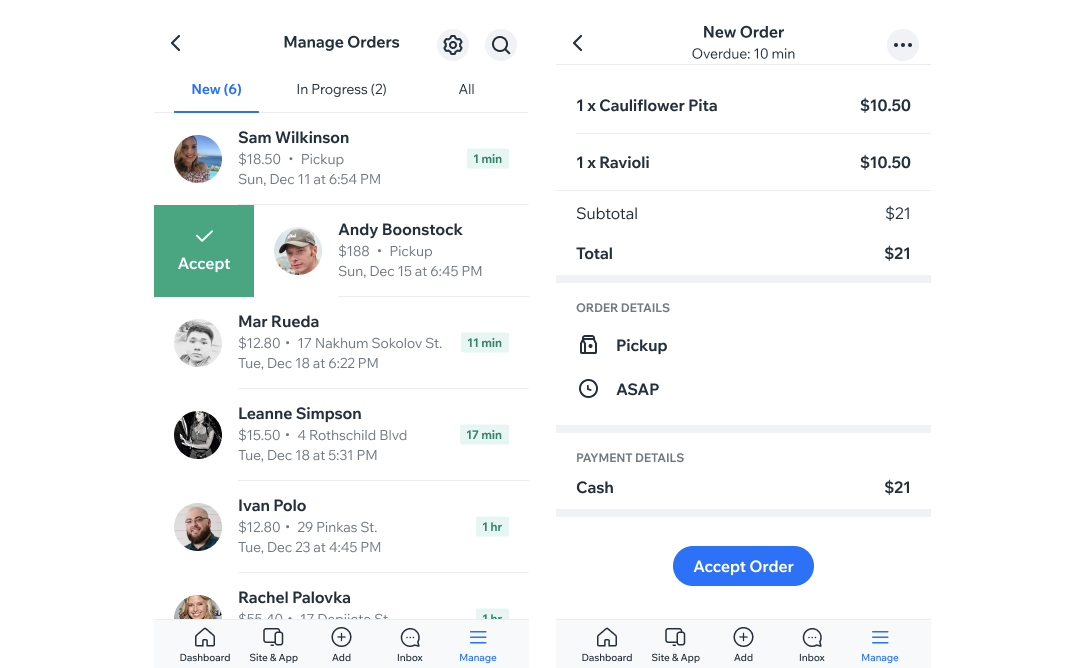
Two screenshots of your restaurant orders in the Wix Owner app and viewing an order in the app.

Tip:

You can swipe an order to the right to quickly accept it.

Need A Professional Website?
Contact Us 
Today!

Wix Stores: Setting Up Affiliate Marketing with the Goaffpro App

Wix Contacts: About Your Contact Panel

Wix Contacts: Using Pinned Actions in Your Contact Panel

Wix Contacts: Creating a Test Contact

Wix Contacts: Changing a Contact's Subscription Status

Wix Contacts: Adding and Managing Custom Contact Fields

Wix Contacts: Creating and Using Contact Labels

Wix Contacts: Creating a Segment

Wix Contacts: About Segments

Wix Contacts: Exporting Your Contacts

Wix Contacts: Troubleshooting Contact Importing Issues

Wix Contacts: Importing Contacts by Uploading a CSV File

Wix Contacts: Importing Contacts from a Gmail Account

Wix Contacts: Managing Your Contact List

Wix Contacts: Manually Adding a Contact

Wix Contacts: An Overview

Wix Forms: Creating a Coupon

Wix Forms: Setting Up Tax on Your Form

Wix Forms: The Difference between the New and Old Wix Forms

Wix Forms: Viewing Form Submissions from Your Dynamic Pages

Wix Forms: Managing Your Forms from the Dashboard

Wix Forms: Choosing an Address Field

Wix Forms: Adding and Setting Up a Donation Form

Wix Forms: Adding Submission Limits to Your Forms

Wix Forms: Adding and Managing Rules

Wix Forms: Upgrading Wix Forms

Wix Forms: Adding and Setting Up a Multi-Step Form

Wix Forms: Adding Payments to a Site Form

Wix Forms: Enabling Double Opt-In for Subscribers

Wix Forms: Adding and Setting Up a Subscribe Form

wix experts
Graphic2Traffic web design
©
bottom of page