top of page

Setting up Photo Albums

Wix Photo Albums: Creating a Favorites List for Clients (Proofing)

You can use Wix Photo Album's proofing feature to let your clients and album visitors create lists of their favorite photos.

It also allows your clients to comment and specify any special instructions they have for the photos. For example, they can let you know how many copies they'd like, or if they'd like a particular photo in black and white.

Important:

Favorites lists are only available for new albums. They are not available for albums that you created in the past.

To create and share a list:

You can create a new favorites list and share it with your clients from Photo Albums in your site's dashboard.

  1. Go to Photo Albums in your site's dashboard.

  2. Create a new album. Learn how to create an album

  3. Click Publish Now.

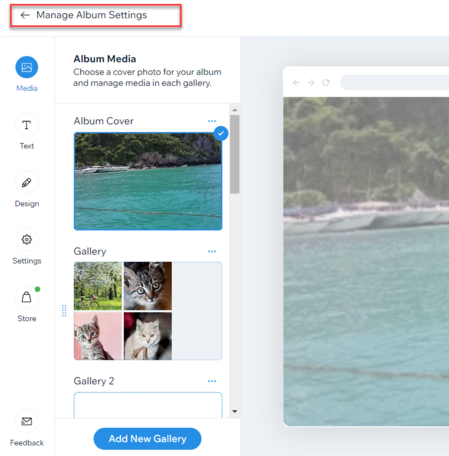
  4. Click Manage Album Settings.

A screenshot of a photo album in edit mode, with the Manage Album setting button highlighted.

  1. Click Get Started under Favorites lists on the right.

  2. Click +Create List.

  3. Add a name for your list.

  4. (Optional) Add instructions or additional information for your clients under Add a note.

  5. Select who can access your list under Privacy settings.Public: Anyone that can view your album can view this list.
    Secret: Only people with the link can access the list.

A screenshot of the edit favorite lists setting panel showing how to edit the list name and change privacy settings.

  1. Click Save.

  2. Choose how you want to share the link, or tap View List to see what it looks like.Copy link: Copy the link and send it to your client.
    Email: Send the link via email.
    WhatsApp: Send the link via WhatsApp.

Tip:

After you've created your list, you can view it on your live site, download the photos that your clients select, update your list's information, and manage your list's members. Learn more about managing your favorites list.

Need A Professional Website?
Contact Us 
Today!

Wix Music: Customizing Your Music Player

Wix Music: Working with the Wix Music Media Manager

Wix Music: General Troubleshooting

Wix Music: Understanding Wix Analytics Reports

Wix Music: Adding and Setting up Wix Music

Wix Music: Managing Tracks

Wix Music: Creating an Album, Single or Playlist

Wix Music: An Overview

Comparison of Audio Elements in Wix

Adding Audio to Your Site

Single Video Player: Customizing Your Single Video Player

Single Video Player: Adding a Video from Twitch

Single Video Player: Uploading Media from Your Video Library

Single Video Player: Adding a Video from Facebook

Single Video Player: Adding a Video from Vimeo

Single Video Player: Retrieving a YouTube URL

Single Video Player: Adding a Video from YouTube

Single Video Player: Settings Per Video Source

Single Video Player: Adding and Setting Up the Single Video Player

Wix Video: Upgrading Your Video Storage

Wix Video: Using Wix Video for Free

Wix Video: Troubleshooting Live Streaming Issues

Wix Video: Live Stream Settings, Resolution, Bitrates and Codecs

Wix Video: Downloading a Live Stream Encoder

Wix Video: Scheduling a Live Stream

Wix Video: Live Streaming from Your Desktop

Wix Video: About Live Streaming

Wix Video: Viewing and Managing Your Subscribers' Information

Wix Video: Connecting a Pricing Plan to a Video Channel

Wix Video: Renting Your Videos

wix experts
Graphic2Traffic web design
©
bottom of page