top of page

Selling and promoting your music

Wix Music: Setting Up Your Payment Methods

Your fans can buy your music in Wix Music and Wix does not charge a cent.

Important:

  • Set up your payment methods by following the steps below before selling your music.

  • The album should not be edited after a purchase is made as this can cause an error with the download link.

To set up your payments:

  1. Go to Accept Payments in your site's dashboard.

  2. Set up the payment methods you want to use.

To change your currency:

  1. Go to Music Library in your site's dashboard.

  2. Hover over the relevant single/album/playlist and click the More Actions icon.

  3. Click Edit.

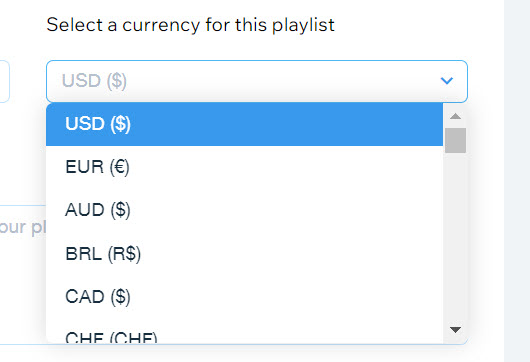
  4. Click the drop-down under Select a currency for this playlist.

  5. Select a currency.

  6. Click Save.

A screenshot of the currency selection drop-down menu.

Notes:

  • Currently, the following payment processors are not supported with Wix Music:pagueloFacil
    Isracard
    Offline.

  • For Wix Payments, there is a minimum amount of $1 per transaction. Make sure your release/track/album's price is over $1 if you're using this payment processor.

Need A Professional Website?
Contact Us 
Today!

Wix Bookings: The Essential Checklist for Professional Bookings Site Owners

Wix Bookings: About Wix Bookings

Resolving Email Issues

Changing the Priority of Your MX Records

Connecting Email Purchased Outside of Wix

Google Workspace: Adding a DKIM Record to your Business Email

Google Workspace: Adding an SPF Record to your Business Email

Adding a DKIM (TXT) Record

Adding or Updating SPF Records in Your Wix Account

Business Email: General Troubleshooting

Connecting Email Accounts from Different Email Providers for the Same Domain

Increasing Email Deliverability of Emails Sent from Your Business Email

Top Reasons for Using a Personalized Business Email

Business Email: An Overview

Activating DNSSEC for a Wix Domain

Transferring Your Wix Domain Away from Wix

ICANN: Confirming Your Domain Contact Information

Connecting a Subdomain to Your Wix Site

Connecting a Wix Domain to an External Site

Transferring Your Wix Domain to a Different Wix Account

Activating Private Registration for a Wix Domain

Checking if a Domain Name is Available

List of Available Domain Extensions

Connecting a Domain Purchased from Wix

Purchasing a Domain vs. Purchasing a Site Plan

Purchasing a Domain from Wix

Connecting a Domain You Own to Your Wix Site

Accessing Your Domains Page

Finding Your Domain Registrar Details

Exporting or Embedding Your Wix Site Elsewhere

wix experts
Graphic2Traffic web design
©
bottom of page