top of page

Designing Wix Events

Wix Events: Displaying a Standalone Wix Events Button

If you write about an event somewhere on your site other than the Wix Events page, you can add a standalone event button. This makes it easy for interested site visitors to book.

Note:

The standalone event button is currently not available in Editor X.

To add an event button:

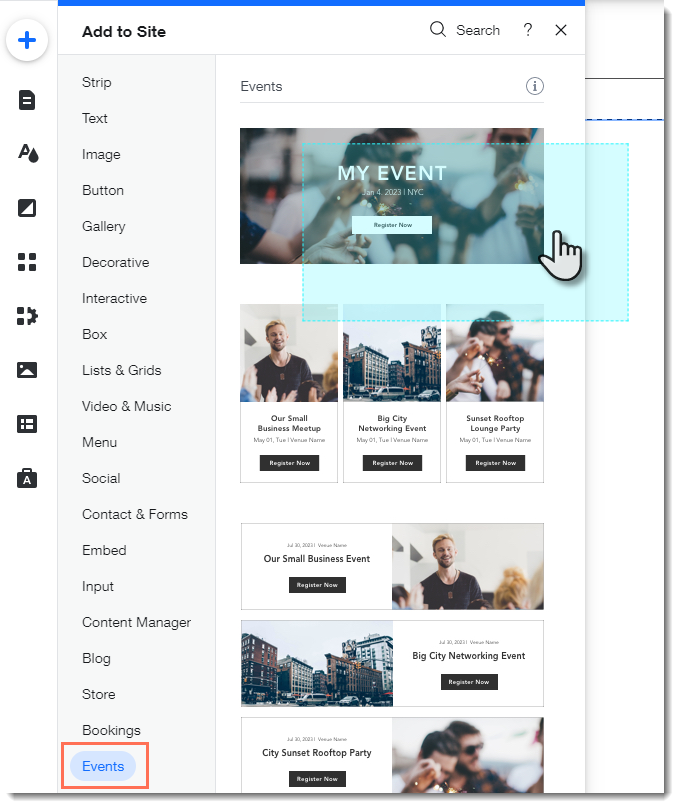
  1. Click Addon the left side of the Editor.

  2. Select Events.

  3. Drag the single event display to the page.
  1. Click the Wix Events app in the Editor.

  2. Click Display Events.

  3. Under What do you want to show?, select A Single Event.

  4. Select the relevant event.

  5. Click the Layout tab.

  6. Select Button.

  7. (Optional) Edit the button:Click the Text tab to edit the button text or add a label.
    Click the Design tab to edit the look of the button.

Need A Professional Website?
Contact Us 
Today!

Wix Bookings: The Essential Checklist for Professional Bookings Site Owners

Wix Bookings: About Wix Bookings

Resolving Email Issues

Changing the Priority of Your MX Records

Connecting Email Purchased Outside of Wix

Google Workspace: Adding a DKIM Record to your Business Email

Google Workspace: Adding an SPF Record to your Business Email

Adding a DKIM (TXT) Record

Adding or Updating SPF Records in Your Wix Account

Business Email: General Troubleshooting

Connecting Email Accounts from Different Email Providers for the Same Domain

Increasing Email Deliverability of Emails Sent from Your Business Email

Top Reasons for Using a Personalized Business Email

Business Email: An Overview

Activating DNSSEC for a Wix Domain

Transferring Your Wix Domain Away from Wix

ICANN: Confirming Your Domain Contact Information

Connecting a Subdomain to Your Wix Site

Connecting a Wix Domain to an External Site

Transferring Your Wix Domain to a Different Wix Account

Activating Private Registration for a Wix Domain

Checking if a Domain Name is Available

List of Available Domain Extensions

Connecting a Domain Purchased from Wix

Purchasing a Domain vs. Purchasing a Site Plan

Purchasing a Domain from Wix

Connecting a Domain You Own to Your Wix Site

Accessing Your Domains Page

Finding Your Domain Registrar Details

Exporting or Embedding Your Wix Site Elsewhere

wix experts
Graphic2Traffic web design
©
bottom of page