top of page

Wix Contacts FAQ

Wix Contacts: Using Pinned Actions in Your Contact Panel

Pinned actions in your contact panel allow you to quickly access frequently-used actions for your contacts. This functionality saves time by letting you perform tasks like sending invoices, managing workflows, or setting up appointments with just a few clicks.
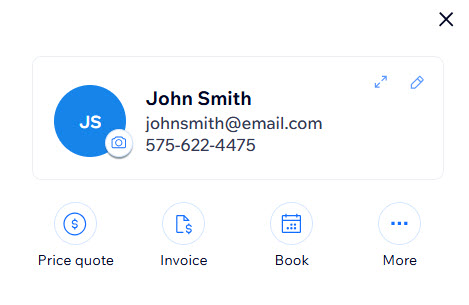
A screenshot of the contact panel showing actions pinned to the top.

Setting pinned actions

Easily access your most-used actions by pinning them to the top of your contact panel.

To set pinned actions:

  1. Go to Contacts in your site's dashboard.

  2. Click on the contact you want to manage to open the contact panel.

  3. Click the More Actions icon .

  4. Click Set pinned actions.
    A screenshot of the contact panel with the More Actions menu open, with the Set pinned actions option highlighted.

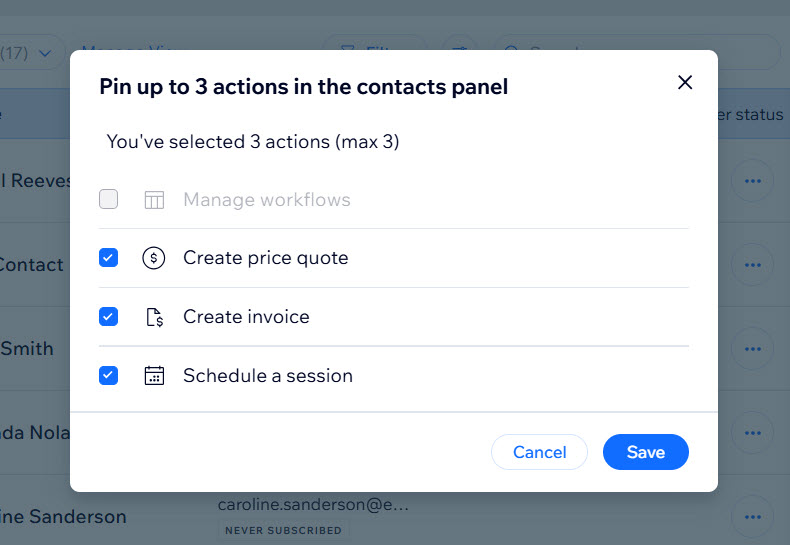
  5. Click the checkboxes to select the actions you want to pin from the available options.
    Note: You can pin a maximum of 3 actions at once.

  6. Click Save.

A screenshot of the pinned actions menu showing the different options available to pin.

FAQs

Click a question below to learn more about pinned actions.

How do I remove a pinned action?

To unpin an action, open the Set pinned actions menu and uncheck the boxes next to the actions you want to remove from the contact panel, and click Save.

Are pinned actions the same for all contacts?

No, pinned actions are set individually for each contact. This allows you to customize actions based on the specific needs of each customer.

Is there a limit to how many actions I can pin?

You can pin a maximum of 3 actions per contact.

Can I pin custom actions?

Currently, you can pin the predefined actions available in the Set pinned actions menu.

Need A Professional Website?
Contact Us 
Today!

Wix Stores: Setting Up Affiliate Marketing with the Goaffpro App

Wix Contacts: About Your Contact Panel

Wix Contacts: Using Pinned Actions in Your Contact Panel

Wix Contacts: Creating a Test Contact

Wix Contacts: Changing a Contact's Subscription Status

Wix Contacts: Adding and Managing Custom Contact Fields

Wix Contacts: Creating and Using Contact Labels

Wix Contacts: Creating a Segment

Wix Contacts: About Segments

Wix Contacts: Exporting Your Contacts

Wix Contacts: Troubleshooting Contact Importing Issues

Wix Contacts: Importing Contacts by Uploading a CSV File

Wix Contacts: Importing Contacts from a Gmail Account

Wix Contacts: Managing Your Contact List

Wix Contacts: Manually Adding a Contact

Wix Contacts: An Overview

Wix Forms: Creating a Coupon

Wix Forms: Setting Up Tax on Your Form

Wix Forms: The Difference between the New and Old Wix Forms

Wix Forms: Viewing Form Submissions from Your Dynamic Pages

Wix Forms: Managing Your Forms from the Dashboard

Wix Forms: Choosing an Address Field

Wix Forms: Adding and Setting Up a Donation Form

Wix Forms: Adding Submission Limits to Your Forms

Wix Forms: Adding and Managing Rules

Wix Forms: Upgrading Wix Forms

Wix Forms: Adding and Setting Up a Multi-Step Form

Wix Forms: Adding Payments to a Site Form

Wix Forms: Enabling Double Opt-In for Subscribers

Wix Forms: Adding and Setting Up a Subscribe Form

wix experts
Graphic2Traffic web design
©
bottom of page