


Wix Contacts FAQ
Wix Contacts: About Segments
Use segments to truly understand your customer base. Gain insights to drive your messaging and marketing campaigns. Strengthen your customer relationships and improve sales by targeting the right customers at the right time.
A segment is a specific group of customers. Segments group your customers using conditions defined by you. Segment your customers based on their attributes or how they've interacted with your site, and personalize the material you send out so your customers feel valued and understood.
Read an example of how one business uses segments
Jane owns a homeware business. She sent out a marketing email about a new wall art collection. Jane wants to reach out to the contacts who may be interested in the collection but haven't yet purchased.
Jane uses segments to view a list of contacts who clicked to open her email, clicked the link to her site within the email but then left her site without making a purchase.
Jane sends this specific group of contacts a discount voucher to encourage them to view the collection again and complete the journey to checkout.
Ready to get started?
Learn how to create a segment.
Know your customer base
Analyze and segment your customer base to gain a greater understanding of who your customers are and how they're interacting with your site.
Wix stores a lot of data about the ways contacts interact with your site (e.g. someone signs up for your newsletter, makes a purchase, views a particular page). You can benefit from this valuable information by using it to help you target customers who have done specific things.
As well as manually creating and reviewing segments, you can use segments overview to monitor activity within key segments that we suggest for you. These focus on the specific populations that represent most value to your business. Click Show Segments Overview above your Contact List to get started.
Note:
To access segments overview, you must have a Business or Business Elite Premium plan and your site must be fully set up for Wix Stores: you must have added the Wix Stores app, added at least 1 product, connected a payment method, and published your site. This feature is not yet available to all users.
Tip:
You can add custom fields to your contacts to enable you to collect additional customer information. These custom fields can also be used as segment filters.
Group your customers in very specific ways
When you create segments, you're organizing your contacts into groups built from specific filters and criteria.
To create a segment, your contacts are filtered by either a contact attribute (city, country, etc.) or contact activity on your site (number of purchases, last purchased, etc.). Once you've decided on your filter, you add conditional logic (is equal to, is less than, etc). Depending on the filter, you might also choose a value.
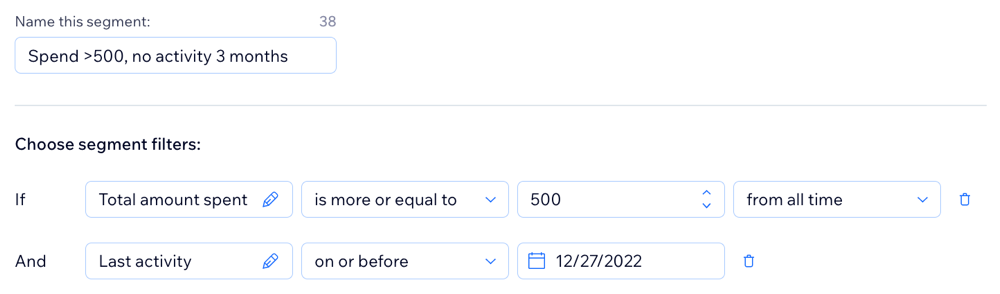
For example, if you know you want to target customers who have spent a lot in the past but haven't visited your site in a while, you could create a segment that identifies people who have spent more than $500 but haven't visited in the last 3 months.
Take inspiration from our suggested templates
Ensure your segments are specific to your business goals. For example, use segments to market a certain product line or improve traffic to a certain part of your site.
The Suggested for you section in the Segments tab of your site's dashboard provides pre-defined segments to get you started. You can set these up as they are or customize them to fit your needs. These are based on common ways of targeting customers.
Additional ideas for targeting include:
Birthdays: Filter by birthday month to congratulate customers and share birthday coupons.
High value: Target the customers most loyal to your business.
Churn potential: Reach out to the people who have been engaging less in recent months.
Specific country: Celebrate a country's national holiday with a targeted email.
Viewed campaign and didn't purchase: Share a discount coupon to tempt your customer to return to your site.
Target the right customers at the right time
You want to understand your customers and you want your customers to feel understood. Once you're happy with a segment you've created, you can create and send an email campaign.
As well as sending this campaign to a specific segment (e.g. "Happy birthday! Here's your birthday discount"), you can use dynamic values to personalize your campaign. Dynamic values replace generic text (e.g. "Special customer, it's your birthday!") with contact information (e.g. "Frank, it's your birthday!").
Have confidence that your segment data is up to date
Data that determines which customers fall into your segments can change very frequently. For example, a segment based on customers opening email campaigns could change multiple times a day.
Targeting the right customers works best when you're dealing with up-to-date data. When you create a new segment, all customers belonging to that segment at that moment in time are added. Segment data is automatically updated once every 24 hours. You can manually refresh segment data at any time to make sure you're viewing the most up-to-date list of contacts in a segment. Follow these steps to manually refresh segment data.