top of page

Additional Wix Apps

Wix Apps: Task List

The Wix Task List add-on enables you to set up and monitor a list of tasks to complete while working on your site. Think of it like a to-do list that's integrated into your site just for you or your co-workers.

A screenshot showing the Task List add on inside the Studio Editor.

To add the Task List add-on to your site:

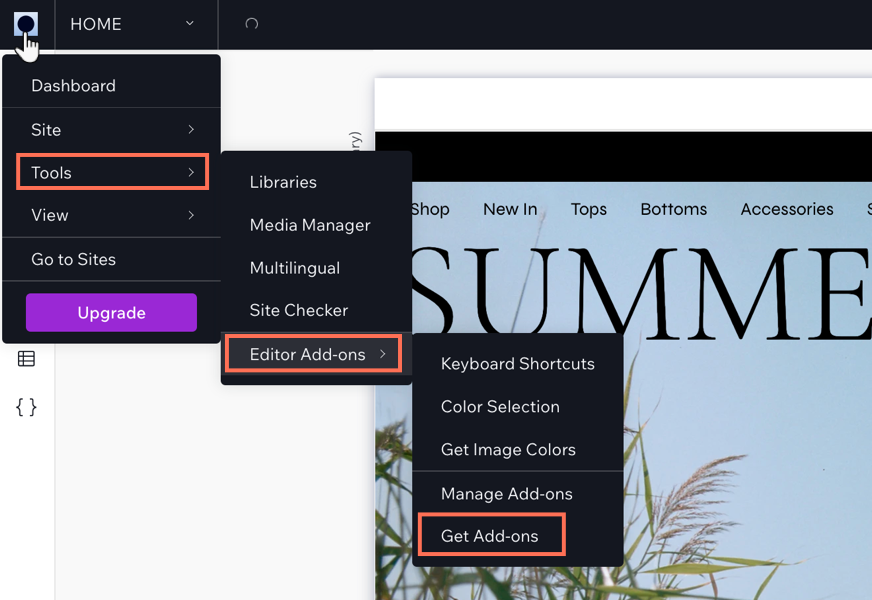
  1. Click the Wix Studio icon  at the top left.

  2. Click Tools.

  3. Click Editor Add-ons.

  4. Click Get Add-ons.

  5. Hover over Task List and click Add.

A screenshot showing the Wix Studio icon and the option to get add-ons.

Once you have added Task List, you can start creating tasks for yourself. When you have finished a task, select the checkmark next to the relevant task and it will move to your 'Completed tasks' section in the add-on.

Need A Professional Website?
Contact Us 
Today!

Keeping the Free Wix URL

Subdomains Overview

About HTTPS and SSL

About Domain Propagation

Replacing Your Site URL with Another Domain Name

Domain Hosting with Wix

About Domains

Wix Studio App: An Overview

About CSS Editing

Working With Layers

Using Global Sections

Using the Inspector Panel

Adding Mouse Effects

Adding Mouse Effects

Adding and Customizing Lottie Animation Files

Adding Header Scroll Effects

Adding an Entrance Animation

Adding a Scroll Animation

Adding a Loop Animation

Creating a Custom Click or Hover Interaction

Adding a Preset Click or Hover Interaction

About Animations

Adding and Setting Up Flexboxes

Working with Docking, Margins and Padding

Setting the Size of Your Elements

Using the Inspector Panel

Building a Responsive Site

Designing Across Breakpoints

Creating a Physical Product

Using AI to Create an Online Store

wix experts
Graphic2Traffic web design
©
bottom of page