top of page

Shared Gallery

Using the Member's Area with the Shared Gallery App

Create a community around your shared gallery system! The Member's Area is the ideal place for people in your community to get to know each other and see which galleries other members uploaded.

Note:

When you add the Shared Gallery app to your site, it comes with the Member's Area already added. The two pages work really well together.

Benefits of Using the Shared Gallery with the Members Area

There are many benefits of using the Shared Gallery that can be seen in the Members Area, for example, members can:

  • Track the amount of uploads, tags and likes that other members have made.

  • Share and report photos through the Members Area.

  • Sort photos, view in expand mode and also delete photos.

Note:

Only members who are part of the community are able to see which photos a member uploaded.
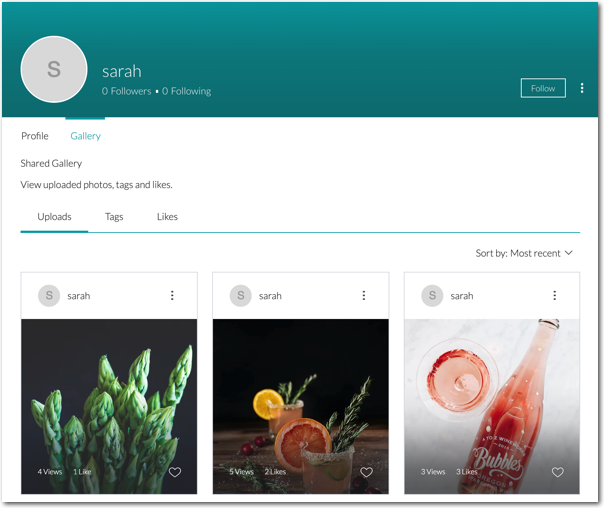
Using the Members Area in other parts of your site:

When a site visitor logs in, they are logged in to all parts of your site. Some parts of your site have their own special member sections. For example, if you have Wix Stores on your site, customers can log in and access their "My Orders" page, where they can view store orders. Click here to learn more.

Need A Professional Website?
Contact Us 
Today!

Wix Stores: Setting Up Affiliate Marketing with the Goaffpro App

Wix Contacts: About Your Contact Panel

Wix Contacts: Using Pinned Actions in Your Contact Panel

Wix Contacts: Creating a Test Contact

Wix Contacts: Changing a Contact's Subscription Status

Wix Contacts: Adding and Managing Custom Contact Fields

Wix Contacts: Creating and Using Contact Labels

Wix Contacts: Creating a Segment

Wix Contacts: About Segments

Wix Contacts: Exporting Your Contacts

Wix Contacts: Troubleshooting Contact Importing Issues

Wix Contacts: Importing Contacts by Uploading a CSV File

Wix Contacts: Importing Contacts from a Gmail Account

Wix Contacts: Managing Your Contact List

Wix Contacts: Manually Adding a Contact

Wix Contacts: An Overview

Wix Forms: Creating a Coupon

Wix Forms: Setting Up Tax on Your Form

Wix Forms: The Difference between the New and Old Wix Forms

Wix Forms: Viewing Form Submissions from Your Dynamic Pages

Wix Forms: Managing Your Forms from the Dashboard

Wix Forms: Choosing an Address Field

Wix Forms: Adding and Setting Up a Donation Form

Wix Forms: Adding Submission Limits to Your Forms

Wix Forms: Adding and Managing Rules

Wix Forms: Upgrading Wix Forms

Wix Forms: Adding and Setting Up a Multi-Step Form

Wix Forms: Adding Payments to a Site Form

Wix Forms: Enabling Double Opt-In for Subscribers

Wix Forms: Adding and Setting Up a Subscribe Form

wix experts
Graphic2Traffic web design
©
bottom of page