top of page

Connecting a domain

Connecting a Domain You Own to Your Wix Site

Connect a domain you already own to your site. If you purchased the domain from another registrar, you can connect it to Wix and choose who hosts the domain records.

You can also connect a domain purchased from Wix, by transferring it from the relevant site / account.

Connect a domain purchased from another host

If you already own a domain from another domain registrar, you can either transfer or connect it to Wix:

  • Transferring a domain: This makes Wix your new domain host. You can manage your domain's contact information, DNS settings, and registration payments directly from your Wix account.

  • Connecting a domain: Your domain host remains outside of Wix. You can connect a domain to your Wix account in two ways - via 'name servers' or 'pointing'.

Tip:

Read about transferring vs. connecting a domain to your Wix account to learn which option best suits your needs.

Move a domain from one Wix site to another

If you already own a domain that you purchased from Wix, you can easily transfer it from one site to another. Learn more about moving a domain from one Wix site to another within the same account.

A screenshot showing the Assign to a different site option for a Wix domain.

Move a domain from one Wix account to another

You can also move a domain you own from one Wix account to another. Learn more about transferring your Wix domain to a different Wix account.
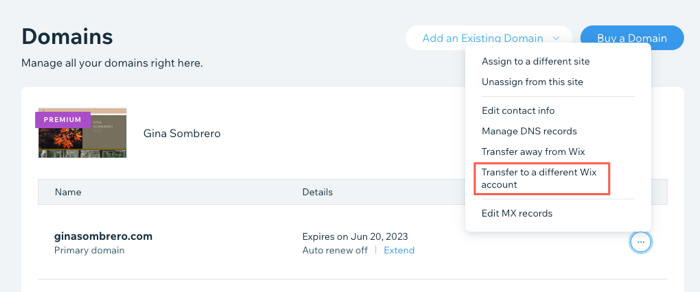
A screenshot showing the Transfer to a different Wix account option for a Wix domain.

Need A Professional Website?
Contact Us 
Today!

Wix Stores: Setting Up Affiliate Marketing with the Goaffpro App

Wix Contacts: About Your Contact Panel

Wix Contacts: Using Pinned Actions in Your Contact Panel

Wix Contacts: Creating a Test Contact

Wix Contacts: Changing a Contact's Subscription Status

Wix Contacts: Adding and Managing Custom Contact Fields

Wix Contacts: Creating and Using Contact Labels

Wix Contacts: Creating a Segment

Wix Contacts: About Segments

Wix Contacts: Exporting Your Contacts

Wix Contacts: Troubleshooting Contact Importing Issues

Wix Contacts: Importing Contacts by Uploading a CSV File

Wix Contacts: Importing Contacts from a Gmail Account

Wix Contacts: Managing Your Contact List

Wix Contacts: Manually Adding a Contact

Wix Contacts: An Overview

Wix Forms: Creating a Coupon

Wix Forms: Setting Up Tax on Your Form

Wix Forms: The Difference between the New and Old Wix Forms

Wix Forms: Viewing Form Submissions from Your Dynamic Pages

Wix Forms: Managing Your Forms from the Dashboard

Wix Forms: Choosing an Address Field

Wix Forms: Adding and Setting Up a Donation Form

Wix Forms: Adding Submission Limits to Your Forms

Wix Forms: Adding and Managing Rules

Wix Forms: Upgrading Wix Forms

Wix Forms: Adding and Setting Up a Multi-Step Form

Wix Forms: Adding Payments to a Site Form

Wix Forms: Enabling Double Opt-In for Subscribers

Wix Forms: Adding and Setting Up a Subscribe Form

wix experts
Graphic2Traffic web design
©
bottom of page