


Wix domains
Activating DNSSEC for a Wix Domain
When you purchase a domain from Wix, you can add Private registration and DNSSEC for an additional fee. DNSSEC (Domain Name System Security Extensions) is available in all non-EU countries, and for all .com domains.
Private registration ensures that your name and contact information aren't publicly visible in the WHOIS directory. DNSSEC helps to protect your site from cyberattacks by adding a security seal to your domain, securing your site visitors' private information.
Private registration and DNSSEC are available when purchasing your domain, or when you manually extend its registration for at least one year.
In this article, learn more about:
Purchasing DNSSEC while extending a domain
To add DNSSEC to an existing domain subscription, extend your domain registration for at least an additional year and choose the Private registration and DNSSEC option.
To extend domain registration and purchase DNSSEC:
Go to Domains in your Wix account.
Click Extend next to the relevant domain.

Select a registration period (e.g., extend by an additional one, two, or three years) and click Continue.
Select Private registration and DNSSEC and click Continue.
Enter your payment information and click Submit Purchase.
Turning off DNSSEC for your domain
You can turn off Privacy and DNSSEC protection by contacting Wix Customer Care. You can't disable this option from your Wix account, but you can follow these steps to review the personal information protected by private registration and DNSSEC before requesting the option is turned off.
To review your privacy and DNSSEC information:
Go to Domains in your Wix account.
Click the Domain Actions icon
 next to the relevant domain.
Click Edit contact info.
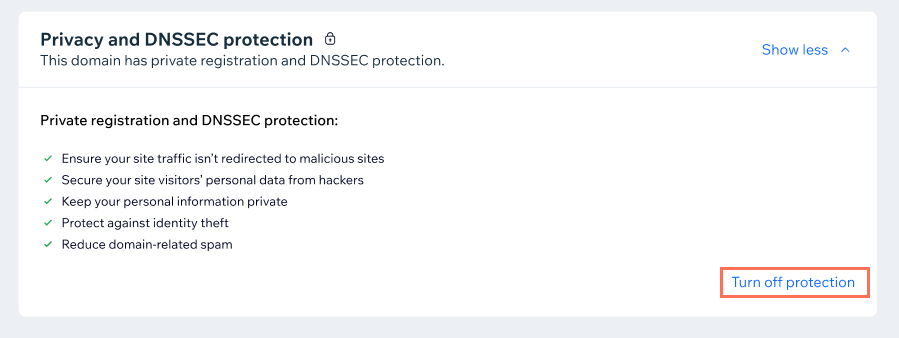
Click Show more next to Privacy and DNSSEC protection at the bottom of the page.
Click Turn off protection.
Review the information on screen.
FAQs
Click below for answers to common questions about DNSSEC.
Can I purchase DNSSEC without private registration?
No. Currently DNSSEC is only available bundled with private registration for added security.
Is it possible to get a refund if I change my mind?
The fee for private registration and DNSSEC is not refundable. You can turn off Privacy and DNSSEC protection if you want your name and contact information to be available to view on the WHOIS database.
Can I apply private registration and DNSSEC to my current domain subscription?
No, you cannot apply private registration and DNSSEC to an existing domain subscription. If you're purchasing a new domain you can add it as an option during the purchase process. If you already have a domain, you can extend your domain subscription and add privacy protection to your cart during the extension process.