top of page

Selling & renting your videos

Wix Video: Allowing Video Downloads

Wix Video lets you set download permissions for each video in your library. You can choose to allow downloads either for free or for a price, or prevent visitors from being able to download the video at all.

To allow video downloads:

  1. Go to your Video Library.

  2. Select the checkboxes next to the videos visitors can download.
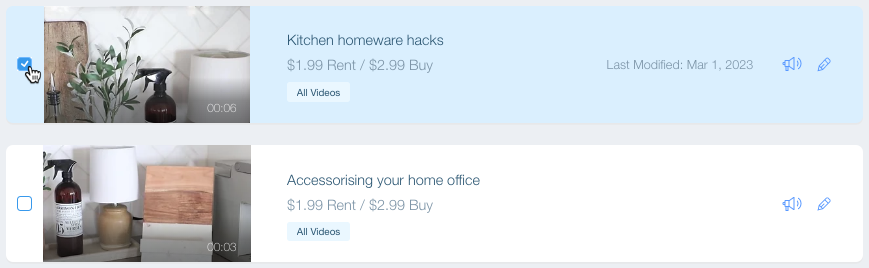
A screenshot showing a video in the Video Library being selected.

  1. Click Set Pricing at the top of the video list.

  2. Select an option:Free: Visitors can watch the videos for free. Click the Download options drop-down and select Allow download.

    Paid: Visitors must pay to watch the video.Select the Video can be purchased checkbox.
    Enter the video price.
    Click the Download options drop-down and select Allow downloads. Note: Videos which can only be rented cannot be downloaded.

  3. Click the Download options drop-down and select Allow downloads.

  4. (Optional) Enter the Price.

  5. Click Save.

Tip:

If you don't want visitors to be able to download your videos, simply select No downloads under the Download options, or offer your video for rent instead of purchase.

Note:

Visitors can only download videos when viewing your site on desktop. They cannot download videos on mobile.

Need A Professional Website?
Contact Us 
Today!

Wix Retail POS: Allowing Customers to Leave Tips

Wix Retail POS: Setting Up Text Receipts

Wix Retail POS: Allowing Customers to Redeem Loyalty Points

Wix Retail POS: Enabling Automatic Discounts

Wix Retail POS: Receiving Notifications

Wix Retail POS: Selling Physical Gift Cards

Wix Retail POS: Selling Virtual Gift Cards

Wix Retail POS: Managing Discounts

Wix Retail POS: Organizing Your Favorites Screen

Wix Retail POS: Disabling Payment Methods

Wix Retail POS: Managing Tax Collection

Wix Retail POS: About the Retail POS Plan

Wix Retail POS: Using Wix Payments as Your Payment Provider

Wix Retail POS: Troubleshooting Your Wix POS

Wix Retail POS: Using the Moneris Go Terminal Card Reader

Wix Retail POS: Connecting a Network Card Reader

Wix Retail POS: Contacting Wix Customer Care for POS Support

Wix POS Terms of Service

Wix Retail POS: Device Security Guidelines

Wix Retail POS: Troubleshooting Your Barcode Scanner

Wix Retail POS: Troubleshooting Your HP Terminal Receipt Printer

Wix Retail POS: Troubleshooting Your Cash Drawer

Wix Retail POS: Updating and Troubleshooting Your Card Reader

Wix Retail POS: Troubleshooting Your Tablet

Wix Retail POS: Updating the Tablet

Wix Retail POS: Checking the Status of Your Hardware

Wix Retail POS: Setting Up the Receipt Printer

Wix Retail POS: About Your HP Barcode Scanner

Wix Retail POS: Using the BBPOS Chipper 2X Card Reader

Wix Retail POS: Managing Your Cash Drawer

wix experts
Graphic2Traffic web design
©
bottom of page